 pyxpo
pyxpoSQLite
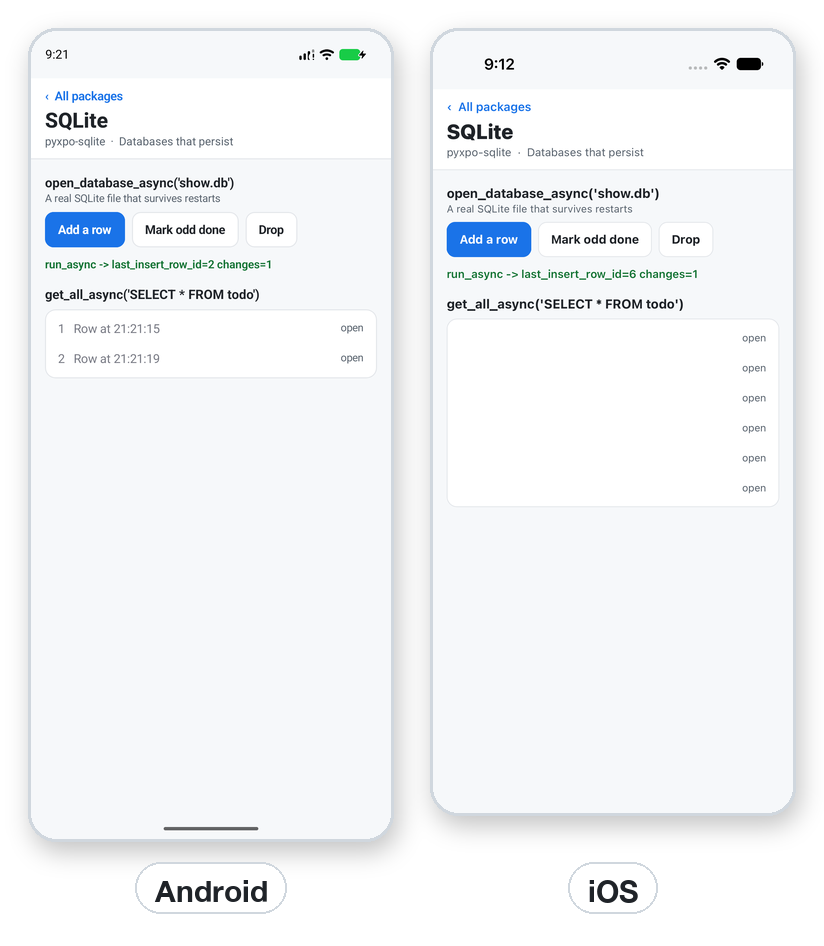
Keep app data in real SQLite files that survive restarts, with the API of expo-sqlite. Rows come back as dicts from get_all_async, get_first_async and get_each_async, parameters can be positional or named ($id, :id, @id), and transactions roll back when your task raises. SQLiteProvider opens the database for a whole screen tree and runs migrations before the children render. Python's sqlite3 runs underneath, async methods use one worker thread per connection, and every method also has a blocking _sync form.
- pyxpo-sqlite
- v0.1.0a1
- Pure Python
- Like expo-sqlite
Install
Install the package into the same environment as pyxpo.
Add sqlite to modules in your app config, then import it in your code.
[tool.pyxpo]
modules = ["sqlite"]import pyxpo_sqlite as SQLiteNeeds Python 3.9+ and pyxpo>=0.1.0a2.
This module is pure Python. It still goes in modules so the build includes it in your app.
Platforms
Quick start
import pyxpo_sqlite as SQLite
from pyxpo import Button, Text, View, component, use_async, use_state


@component
def Todos():
    taps, set_taps = use_state(0)
    rows, set_rows = use_state([])

    async def run():
        db = await SQLite.open_database_async("app.db")
        await db.exec_async(
            "CREATE TABLE IF NOT EXISTS todo (id INTEGER PRIMARY KEY, title TEXT NOT NULL, done INTEGER DEFAULT 0)")
        if taps > 0:
            await db.run_async("INSERT INTO todo (title) VALUES (?)", "Todo #%d" % taps)
        set_rows(await db.get_all_async("SELECT * FROM todo ORDER BY id"))

    use_async(run, [taps])
    return View(
        *[Text("%s  %s" % (r["id"], r["title"])) for r in rows],
        Button("Add a row", lambda: set_taps(taps + 1)),
    )
Permissions
pyxpo adds these to Info.plist and AndroidManifest.xml for you when the module is listed.
| iOS | None. |
|---|---|
| Android | None. |
API reference
Opening
Opening the same file again shares one connection, counted so each close_async pairs with an open. Calling open_database_async on every render is fine.
await open_database_async(database_name, options=None, directory=None)→ SQLiteDatabaseA name in the default folder, an absolute path, or ":memory:" for a private in-memory database. SQLiteOpenOptions(use_new_connection=True) gives a separate connection.
await delete_database_async(database_name, directory=None)→ NoneDeletes the file and its -wal, -shm and -journal files. Close it first.
await deserialize_database_async(data)→ SQLiteDatabaseAn in-memory database from bytes made by serialize_async. Python 3.11+.
default_database_directory→ strThe default folder. Private to the app and kept across updates.
Queries
Parameters are positional (run_async(sql, 1, "a")), one list or tuple (run_async(sql, [1, "a"])), or a dict for $id, :id or @id, where the prefix in the dict is optional. Values map to int, float, str, bytes and None.
await db.exec_async(source)→ NoneSeveral statements, no result. Good for PRAGMA and CREATE TABLE.
await db.run_async(source, *params)→ SQLiteRunResultlast_insert_row_id and changes.
await db.get_first_async(source, *params)→ dict or NoneThe first row.
await db.get_all_async(source, *params)→ list[dict]Every row.
db.get_each_async(source, *params)→ async iteratorasync for row in ...: reads in batches of 64, for big results.
await db.serialize_async(database_name="main")→ bytesThe database file as bytes, for a backup. Python 3.11+.
await db.close_async()→ NoneCloses when every opener closed it. Attributes: database_name, database_path, options.
Transactions
await db.with_transaction_async(task)→ NoneRuns await task() in a transaction and rolls back if it raises. It joins other queries made meanwhile on the same connection.
await db.with_exclusive_transaction_async(task)→ NoneRuns task(txn) on its own connection inside BEGIN EXCLUSIVE. Use only txn inside. Not available for ":memory:".
await db.is_in_transaction_async()→ boolWhether a transaction is open.
Prepared statements
await db.prepare_async(source)→ SQLiteStatementA statement to run many times with different values.
await stmt.execute_async(*params)→ SQLiteExecuteResultlast_insert_row_id, changes, and the rows with get_all_async() and get_first_async(), or iterate it.
await stmt.get_column_names_async()→ list[str]The result columns.
await stmt.finalize_async()→ NoneFrees the statement. Using it afterwards raises ProgrammingError.
Provider and hook
SQLiteProvider(*children, database_name, options=None, directory=None, on_init=None, on_error=None, fallback=None)Opens the database for the tree. on_init(db) is awaited before the children render, for migrations. Without on_error the error goes to the nearest ErrorBoundary. fallback shows while opening. Closes on unmount.
use_sqlite_context()→ SQLiteDatabaseThe provider's database. Raises RuntimeError outside a provider.
Types
Each method has _async and _sync forms (open_database_sync, db.run_sync and so on). camelCase names such as getAllAsync and lastInsertRowId also work.
Errors
| Key | Type | Description |
|---|---|---|
sqlite3.OperationalError | SQL | Bad SQL, a missing table, a locked database, or deleting an open database. Fix the SQL; close before deleting. |
sqlite3.IntegrityError | constraint | NOT NULL, UNIQUE and so on. Validate before inserting, or catch it. |
sqlite3.ProgrammingError | usage | A closed database, a finalized statement, or the wrong number of parameters. |
sqlite3.NotSupportedError | feature | serialize or deserialize before Python 3.11, or an exclusive transaction on :memory:. |
FileNotFoundError | delete | delete_database_async of a missing file. |
RuntimeError | context | use_sqlite_context() without an SQLiteProvider. |
Examples
Recipe: a todo list with migrations
A provider, a migration that keeps a schema version in PRAGMA user_version, and an add action.
from pyxpo import Button, Text, View, component, use_async, use_state
from pyxpo_sqlite import SQLiteProvider, use_sqlite_context


async def migrate(db):
    row = await db.get_first_async("PRAGMA user_version")
    version = row["user_version"]
    if version < 1:
        await db.exec_async("CREATE TABLE todo (id INTEGER PRIMARY KEY, title TEXT NOT NULL, done INTEGER DEFAULT 0)")
        await db.exec_async("PRAGMA user_version = 1")


@component
def TodoList():
    db = use_sqlite_context()
    n, set_n = use_state(0)
    rows, set_rows = use_state([])

    async def refresh():
        if n > 0:
            await db.run_async("INSERT INTO todo (title) VALUES (?)", "Item %d" % n)
        set_rows(await db.get_all_async("SELECT * FROM todo ORDER BY id"))

    use_async(refresh, [n])
    return View(
        *[Text(("[x] " if r["done"] else "[ ] ") + r["title"]) for r in rows],
        Button("Add", lambda: set_n(n + 1)),
    )


def App():
    return SQLiteProvider(TodoList(), database_name="todos.db", on_init=migrate, fallback=Text("Opening..."))
Transactions and prepared statements
Move money in one transaction, and insert many rows with one prepared statement.
async def transfer(db):
    async def move():
        await db.run_async("UPDATE account SET cents = cents - 500 WHERE id = 1")
        await db.run_async("UPDATE account SET cents = cents + 500 WHERE id = 2")

    await db.with_transaction_async(move)          # rolls back if move raises


async def add_many(db, titles):
    stmt = await db.prepare_async("INSERT INTO todo (title) VALUES ($title)")
    try:
        for t in titles:
            await stmt.execute_async({"$title": t})
    finally:
        await stmt.finalize_async()
Testing
:memory: databases run on the desktop, so you can test real SQL without a phone.
import asyncio
import sqlite3

import pytest
import pyxpo_sqlite as SQLite


def test_insert_and_query():
    async def go():
        db = await SQLite.open_database_async(":memory:")
        await db.exec_async("CREATE TABLE t (id INTEGER PRIMARY KEY, name TEXT NOT NULL)")
        res = await db.run_async("INSERT INTO t (name) VALUES (?)", "a")
        rows = await db.get_all_async("SELECT * FROM t WHERE name = $n", {"$n": "a"})
        return res, rows

    res, rows = asyncio.run(go())
    assert (res.last_insert_row_id, res.changes) == (1, 1)
    assert rows == [{"id": 1, "name": "a"}]


def test_constraint():
    db = SQLite.open_database_sync(":memory:")
    db.exec_sync("CREATE TABLE t (x TEXT NOT NULL)")
    with pytest.raises(sqlite3.IntegrityError):
        db.run_sync("INSERT INTO t VALUES (NULL)")
Good to know
- Not supported: change listeners (re-query after your own writes), SQLCipher encryption, loading extensions, and expo-sqlite's key-value Storage (use pyxpo-storage).
- "database is locked" means two connections wrote at once. Use one shared connection, WAL mode, or an exclusive transaction.
- "no such table" means the migration did not run. Create tables in on_init or before the first query.
- Python's sqlite3 runs underneath, so tools built on it can use the same file. This package gives you the expo-sqlite API.