 pyxpo
pyxpoDot env
Put settings such as API URLs, feature flags and public keys in .env files, one set per build mode (development, staging, production), and read them in the app with typed getters. Only PYXPO_PUBLIC_ variables ship inside the app. Everything else stays in os.environ on the build machine, for app_config.py, plugins and build tools. The build fails when a public value looks like a server secret. Pure Python, so it works the same on Android, iOS, the web, Mac and Windows.
- pyxpo-dot-env
- v0.1.0a1
- Pure Python
- Like Expo EXPO_PUBLIC_ variables and react-native-config
Install
Install the package into the same environment as pyxpo.
Add dot-env to modules in your app config, then import it in your code.
[tool.pyxpo]
modules = ["dot-env"]from pyxpo_dot_env import envNeeds Python 3.9+ and pyxpo>=0.1.0a4.
This module is pure Python. It still goes in modules so the build includes it in your app.
Platforms
Quick start
from pyxpo import Text, View, component, use_async
from pyxpo_dot_env import env

import app.api as api


@component
def App():
    async def load():
        await api.connect(env.url("API_URL"), retries=env.int("RETRIES", 3))

    use_async(load, [])
    return View(
        Text("Server: %s" % env.url("API_URL")),
        Text("Languages: %s" % ", ".join(env.list("LOCALES", ["en"]))),
        Text("Production build" if env.is_production else "Mode: %s" % env.mode),
        style={"flex": 1, "padding": 16},
    )
Configuration
Files and modes
Files are read from the project folder (next to pyproject.toml), lowest priority first: .env, .env.<mode>, .env.local, .env.<mode>.local. A variable already set in the environment (CI) wins over every file. pyxpo run builds development, pyxpo build --release builds production, and --mode staging (or PYXPO_MODE=staging) picks any other mode. Run python -m pyxpo_dot_env init to create .env and .env.example and git-ignore .env*.local and .env.keys.
# .env (shared, commit it if it holds no secrets)
PYXPO_PUBLIC_API_URL=http://10.0.2.2:8000        # the host machine, seen from the Android emulator
PYXPO_PUBLIC_RETRIES=3
PYXPO_PUBLIC_LOCALES=en,hi

# .env.production
PYXPO_PUBLIC_API_URL=https://api.example.com
PYXPO_PUBLIC_RETRIES=5

# .env.local (git-ignored, build-only: no PYXPO_PUBLIC_ prefix)
SENTRY_AUTH_TOKEN=...
Schema
Optional. Without it every public variable ships as a string and the getters convert it. With it, the build checks each value, fills in defaults and ships typed values, and lists every problem at once. Entries without the prefix are build-only: checked, never shipped. required can be a list of modes, such as ["production"].
[tool.pyxpo.module_options.dot-env.vars]
PYXPO_PUBLIC_API_URL      = { type = "url", required = true, description = "Backend base URL", example = "https://api.example.com" }
PYXPO_PUBLIC_RETRIES      = { type = "int", default = 3 }
PYXPO_PUBLIC_NEW_CHECKOUT = { type = "bool", default = false, description = "Feature flag" }
PYXPO_PUBLIC_THEME        = { choices = ["light", "dark"], default = "light" }
PYXPO_PUBLIC_FLAGS        = "json"                      # short form: just the type
SENTRY_AUTH_TOKEN = { required = true } # build-only: checked, never shipped| Option | Type | Default | What it does |
|---|---|---|---|
type | str | "str" | str, int, float, bool, url, list (comma separated) or json. |
required | bool or list | false | The build fails when the variable is missing or empty, in every mode or only in the listed modes. |
default | any | none | Used when the variable is not set. |
choices | list | none | The allowed values. |
pattern | str | none | A regular expression the whole value must match. |
description | str | none | Shown in errors and in .env.example. |
example | str | none | Shown in the "required but not set" error and written to .env.example. |
Options
Set in [tool.pyxpo.module_options.dot-env]. An unknown option is an error, so a misspelled one is never ignored.
[tool.pyxpo.module_options.dot-env]
strict = true                          # every PYXPO_PUBLIC_ variable must be in vars
allow = ["PYXPO_PUBLIC_DEMO_TOKEN"]    # skip the leak guard for these names
dir = "config"                         # read the .env files from ./config
git_check = true # warn about env files git would commit| Option | Type | Default | What it does |
|---|---|---|---|
vars | table | none | The schema above. |
strict | bool | false | A PYXPO_PUBLIC_ variable that is not in vars stops the build, so a typo cannot ship. |
allow | list | [] | Public variable names the leak guard accepts (a false alarm, or a key that is public on purpose). |
dir | str | the project folder | The folder that holds the .env files, relative to the project. |
git_check | bool | true | false turns off the git warnings. |
${VAR} in [tool.pyxpo]
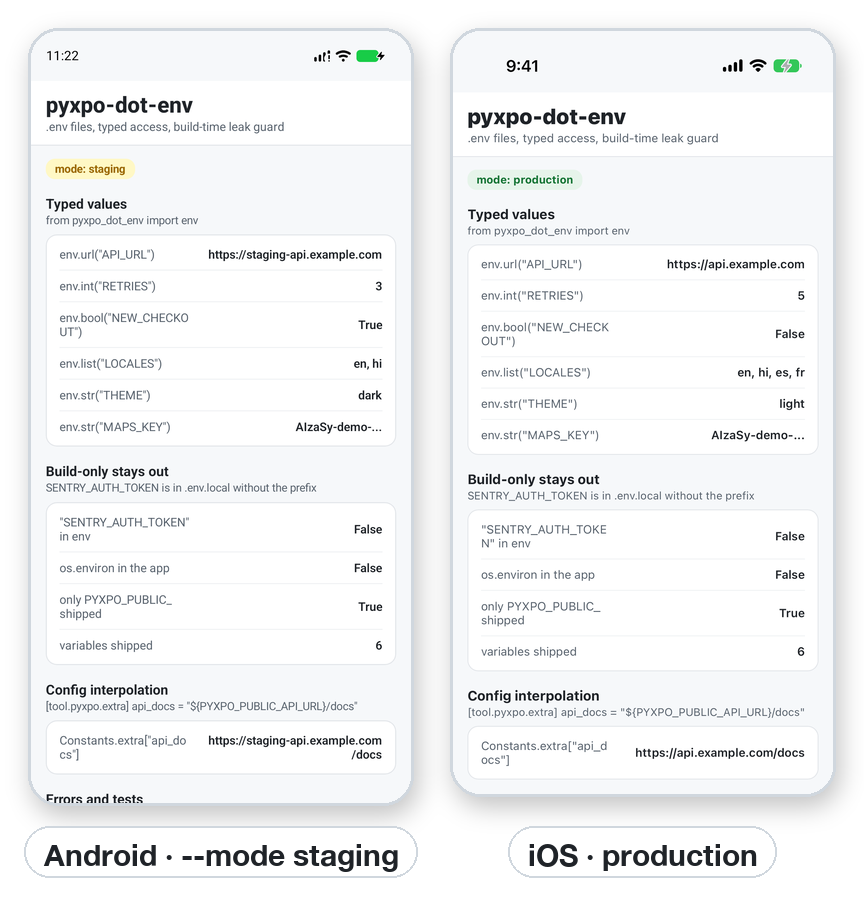
Any string in [tool.pyxpo] can use the loaded variables, with the same ${VAR}, ${VAR:-fallback} and $${ rules as the .env files. extra ships inside the app, so it may only use PYXPO_PUBLIC_ variables; a build-only variable there is an error.
[tool.pyxpo]
name = "${APP_NAME:-My App}"

[tool.pyxpo.ios]
bundle_identifier = "com.example.app${BUNDLE_SUFFIX:-}"    # .env.staging: BUNDLE_SUFFIX=.staging

[tool.pyxpo.extra]
api_docs = "${PYXPO_PUBLIC_API_URL}/docs"                  # read with Constants.extra["api_docs"]
Permissions
pyxpo adds these to Info.plist and AndroidManifest.xml for you when the module is listed.
| iOS | None. |
|---|---|
| Android | None. |
API reference
env
The shared Env instance. Every name may be given with or without the PYXPO_PUBLIC_ prefix. A getter without a default raises EnvError when the variable is not set, or when the value does not fit the type.
env.str(name, default=...)→ strThe value as text.
env.int(name, default=...)→ intA whole number (1_000 and +5 work).
env.float(name, default=...)→ floatA finite number.
env.bool(name, default=...)→ booltrue/false, 1/0, yes/no, on/off, in any case.
env.url(name, default=...)→ strA full URL with a scheme and host.
env.list(name, default=...)→ list[str]Comma-separated items, trimmed, empty items dropped.
env.json(name, default=...)→ anyParsed JSON.
env.get(name, default=None)The value as shipped: typed when the schema declares it, else text.
env[name]The value as shipped; EnvError when not set.
name in env, len(env), iter(env)Membership, count and sorted full names of the shipped variables.
env.require(*names)→ NoneRaises one EnvError that lists every name that is not set.
env.to_dict()→ dictA copy of all shipped variables.
env.mode→ strThe build mode: "development", "production", "staging", ...
env.is_production, env.is_development→ boolmode == "production" / mode == "development".
env.override(**values)Context manager for tests. None removes a variable. Nests.
env.reload()→ NoneReads the shipped data again.
Other names
EnvErrorSubclass of LookupError, raised by the getters.
PREFIX"PYXPO_PUBLIC_"
pyxpo_dot_env.build.analyze(project, mode, config, environ=None)Runs the build checks without a build. Returns a report with public (what ships), errors, warnings, schema and loaded.
pyxpo_dot_env.guard.secret_kind(value)→ str or NoneThe kind of secret a value looks like.
pyxpo_dot_env.guard.mask(value)→ strThe value with all but a short prefix hidden.
Command line
Run in the project folder (or pass --dir path/to/app). Each takes --mode (default development).
python -m pyxpo_dot_env check --mode productionRuns every build check and prints the files read, the variables that ship, warnings and errors. Exits 1 on an error, so it fits in CI.
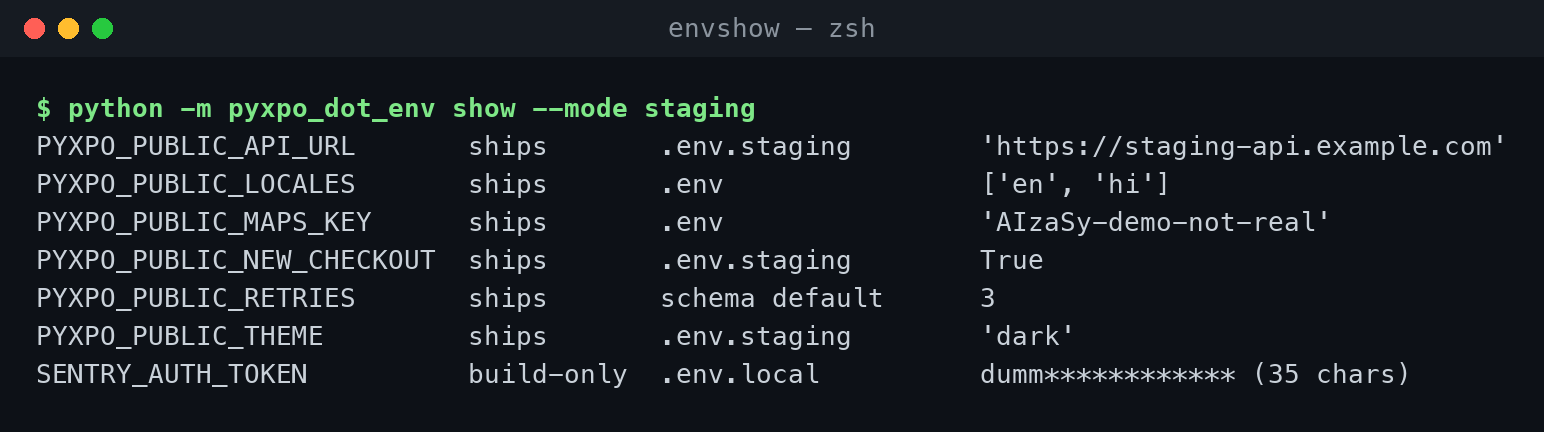
python -m pyxpo_dot_env show --mode stagingLists every variable, whether it ships, its source file and its value. Build-only values are masked.
python -m pyxpo_dot_env examplePrints a .env.example with only safe example values. --write saves it.
python -m pyxpo_dot_env initCreates .env and .env.example and git-ignores .env*.local and .env.keys. Never overwrites a file.
PYXPO_MODE / PYXPO_NO_DOTENV=1The build mode when --mode is not given / ignore the .env files and use only the environment.
Examples
Typed values
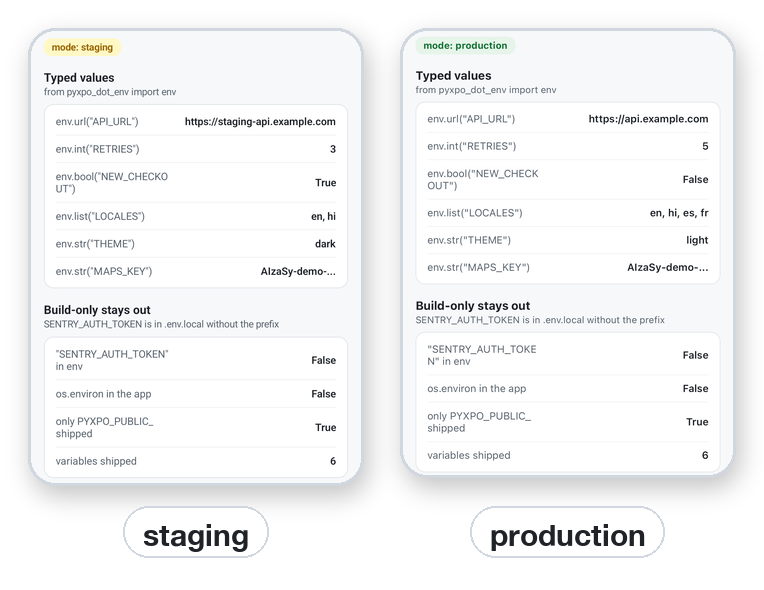
Getters convert and check the value. Build-only variables are not there: "SENTRY_AUTH_TOKEN" in env is False, and they are not in the app's os.environ either.
from pyxpo_dot_env import env

env.int("RETRIES", 3)             # 3 when not set; EnvError when set to "three"
env.bool("NEW_CHECKOUT", False)   # true/false, 1/0, yes/no, on/off
env.list("LOCALES", ["en"])       # "en,hi,es" -> ["en", "hi", "es"]
env.json("LIMITS", {})            # '{"free": 3}' -> {"free": 3}
env.require("API_URL", "SUPPORT_EMAIL")   # one EnvError that lists every missing name
The leak guard
Every build checks each public name and value. It stops on AWS keys, Stripe secret keys, OpenAI and Anthropic keys, private keys, GitHub and Slack tokens, Google client secrets, Supabase service_role keys, passwords in URLs, and public names containing SECRET, PASSWORD or PRIVATE. Keys made to be public (AIza..., pk_..., Supabase anon keys, Sentry DSNs) pass. Values are masked in every message.
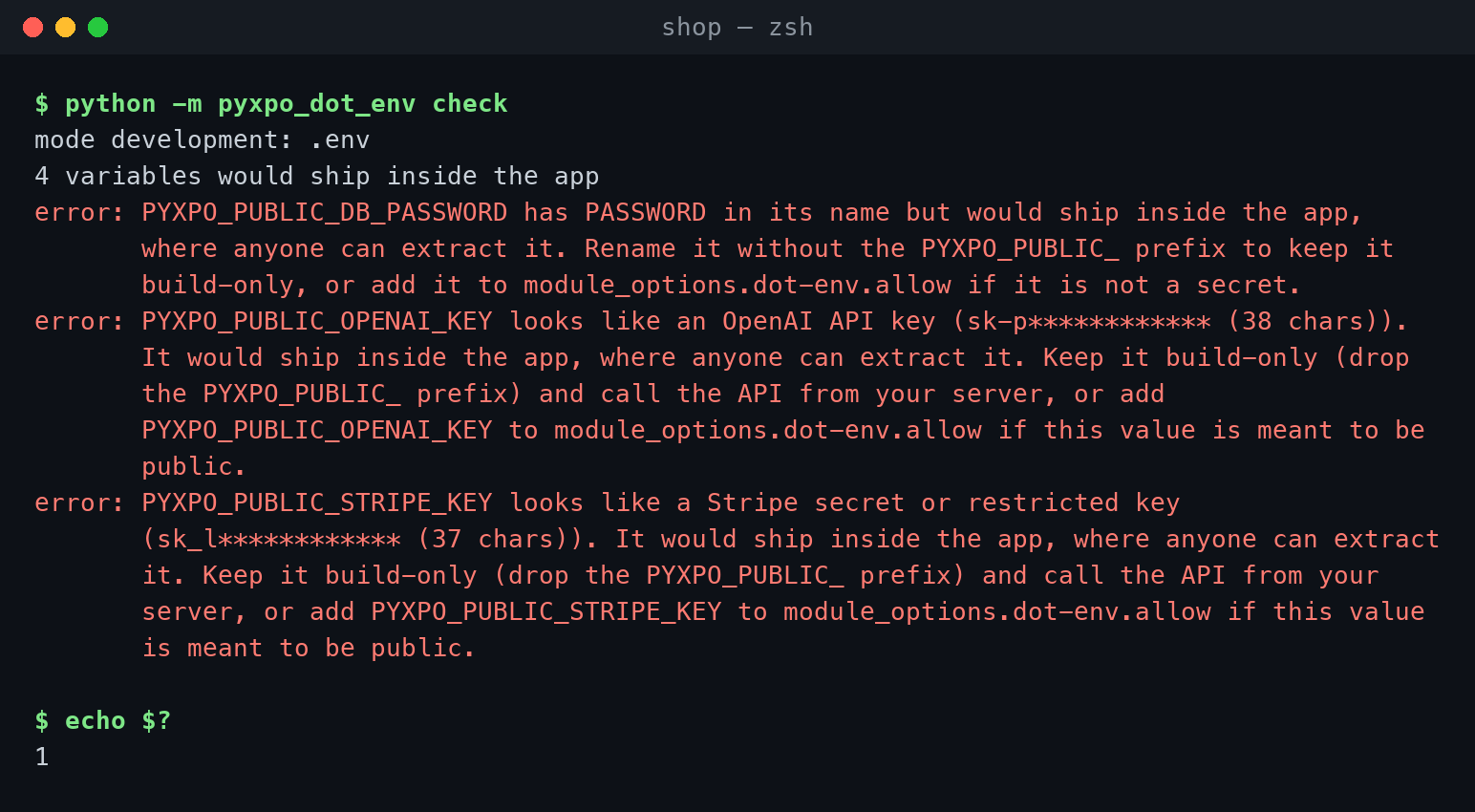
python -m pyxpo_dot_env check --mode production   # the same checks as the build; exits 1 on an error
python -m pyxpo_dot_env show --mode staging       # what ships, from which file
See what ships
show lists every variable with its mode, source file and value, so you can tell why a value wins.
pyxpo run android --mode staging        # staging: .env.staging wins over .env
pyxpo build android --release           # production: .env.production wins over .env
Override values in tests
Outside a pyxpo build, env is empty until you override it.
from pyxpo_dot_env import env

import app.api as api


def test_uses_local_server():
    with env.override(API_URL="http://localhost:8000", RETRIES="1"):
        assert api.base_url() == "http://localhost:8000"
Good to know
- An app package can be unzipped by anyone. Only put a value behind PYXPO_PUBLIC_ when you would be fine with it on a public web page. Paid API keys belong on your server.
- Values are read at build time. After you edit a .env file, run pyxpo run android or ios again. The web dev server rebuilds by itself.
- For values that belong to one user, such as login tokens, use secure-store instead.
- dotenvx encrypted values are detected; build through dotenvx run -- pyxpo build ... so they are decrypted for the build.