 pyxpo
pyxpoMesh View
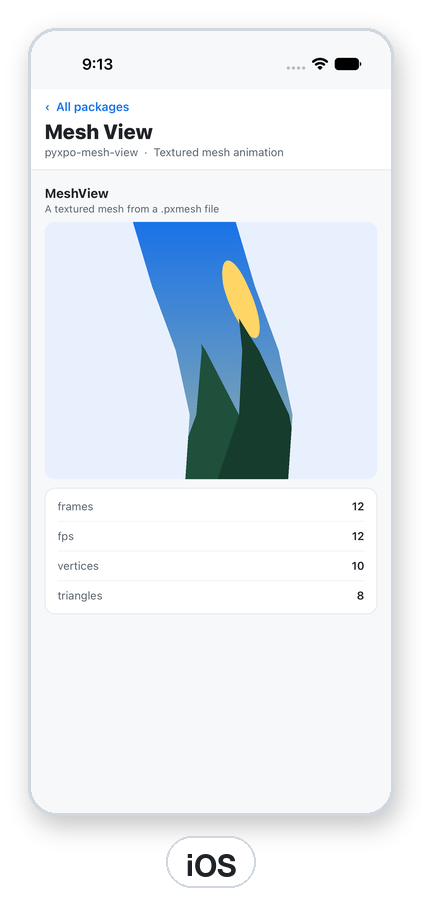
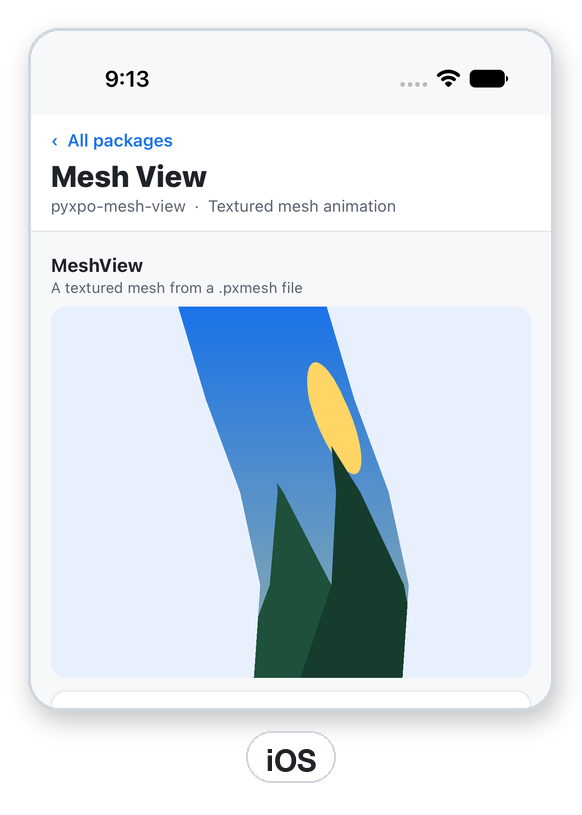
MeshView draws a picture through a triangle mesh whose vertices move each frame, at the file's frame rate times speed, looping or once. Pause, resume and seek to any frame, and change which triangles draw in front per frame, so an arm can swing from behind the body to in front of it. The clip lives in a small binary format (PXMESH1) that write_mesh makes from plain lists or numpy arrays, and export_async renders it on the device to an MP4 (H.264) or an animated GIF with progress. Python only sets props and seeks: the native side advances the frames.
- pyxpo-mesh-view
- v0.1.0a1
- Native: Swift + Kotlin
- Like none (pyxpo only)
Install
Install the package into the same environment as pyxpo.
Add mesh-view to modules in your app config, then import it in your code.
[tool.pyxpo]
modules = ["mesh-view"]import pyxpo_mesh_view as MeshViewNeeds Python 3.9+ and pyxpo>=0.1.0a3.
This module has native code. After you add it, run pyxpo run or pyxpo build again so it is compiled into the app. Hot reload alone is not enough.
Platforms
Quick start
import os
import tempfile

from pyxpo import Button, Text, View, component, use_ref, use_state
import pyxpo_mesh_view as MeshView

# A square of two triangles over the whole picture that leans over in one second.
UV = [(0, 0), (1, 0), (1, 1), (0, 1)]
FRAMES = [[(x + 0.2 * k / 30 * y, y) for x, y in UV] for k in range(30)]
SWAY = os.path.join(tempfile.gettempdir(), "sway.pxmesh")
with open(SWAY, "wb") as f:
    f.write(MeshView.write_mesh(UV, FRAMES, orders=[[0, 1, 2, 0, 2, 3]], fps=30))


@component
def Player(picture_path):
    player = use_ref(None)
    playing, set_playing = use_state(True)
    info, set_info = use_state(None)
    problem, set_problem = use_state("")
    return View(
        MeshView.MeshView(ref=player, source=SWAY, texture=picture_path, playing=playing,
                          on_load=set_info, on_error=lambda e: set_problem(e["message"]),
                          style={"flex": 1}),
        Text(problem or ("%d frames at %g fps" % (info["frames"], info["fps"]) if info else "Loading")),
        Button(title="Pause" if playing else "Play", on_press=lambda: set_playing(not playing)),
        Button(title="Restart", on_press=lambda: player.current.seek(0)),
        style={"flex": 1},
    )
Permissions
pyxpo adds these to Info.plist and AndroidManifest.xml for you when the module is listed.
| iOS | None. No Info.plist texts. |
|---|---|
| Android | None. |
API reference
MeshView props
The files must exist on the device: write them to the app cache or documents folder, or ship them as assets and copy them out. A view reads each path once, and the web caches files by URL, so write a new animation to a new file name.
sourceA PXMESH1 file: a plain path or a file:// URI. http URLs raise ValueError; download first.
textureA PNG or JPEG: a path or a file:// URI.
playingDefault True. False holds the current frame. Seek while paused to scrub.
loopDefault True. False stops on the last frame and calls on_end. Seek to 0 and set playing=True to replay.
speed0 to 16 times the file's frame rate, default 1.0. 0 holds the frame like a pause.
background_colorAny pyxpo color drawn under the mesh, default "transparent".
on_load(info){"frames", "fps", "vertices", "triangles"} when a file is ready.
on_error({"message"}), on_end()A file cannot be read or decoded, and a clip with loop=False reached its last frame.
styleSizes the view. The animation is fitted inside and centred, like resize_mode="contain".
ref.current
Pass ref=use_ref(None). After mount, ref.current is a MeshViewHandle.
seek(frame)→ NoneShows frame (0-based, wraps when loop is on) and plays on from there if playing. A negative or non-int frame raises ValueError; before mount it raises RuntimeError.
Writing a mesh
Plain lists and numpy arrays both work, up to 65536 vertices.
write_mesh(uv, frames, orders, order_of_frame=None, fps=30)→ bytesuv is (V, 2), 0 to 1 in the texture, y down. frames is (F, V, 2) positions in any units, y down, scaled into the box around every frame. orders is a list of triangle lists (three vertex ids each), back to front; shorter ones are padded with degenerate triangles. order_of_frame picks the order per frame (default 0). fps is above 0.
read_header(data)→ dict{"vertices", "frames", "indices", "orders", "fps", "aspect"}. Raises ValueError for bad counts or a size that does not match.
Export
MP4 side lengths are rounded to multiples of 16 and GIF's to multiples of 2. On the web and desktop the page encodes and Python writes the file to path, so it behaves the same everywhere.
await export_async(source, texture, path, *, format=None, size=None, aspect=None, padding=0.05, background_color="#ffffff", fps=None, loops=1, on_progress=None)→ dict{"path", "format", "width", "height", "frames", "fps", "duration"}. format is "mp4" or "gif", default from the extension of path.
export_plan(header, format, size=None, aspect=None, padding=0.05, fps=None, loops=1)→ dict{"width", "height", "rect", "fps", "frames"}: what export_async will ask the native side to draw. No drawing, so it is good for checks and tests.
Types
Results and options are plain Python dicts with these keys.
Export options
| Key | Type | Description |
|---|---|---|
size | int | The longer side in pixels, 32 to 2048. Default 720 (MP4), 480 (GIF). |
aspect | float | Output width / height, default the clip's. The clip is fitted inside and centred. |
padding | float | A fraction of the longer side on every edge, 0 to 0.45. Default 0.05. |
background_color | color | Opaque; any alpha is ignored. Default "#ffffff". |
fps | float | 1 to 60. Default the clip's rate up to 30 (MP4), half of it up to 15 (GIF). |
loops | int | Repeats the clip in the file, 1 to 100. A GIF also loops forever when played. |
on_progress | callable | Called with 0 to 1. |
PXMESH1 (little-endian)
| Key | Type | Description |
|---|---|---|
magic | 8 bytes | b"PXMESH1\0" (MAGIC). The header is 32 bytes (HEADER_SIZE). |
V, F, I, O | u32 each | Vertices, frames, indices per order (a multiple of 3), orders. |
fps, aspect | f32 each | Frame rate, and width / height of the box around every frame. |
uv | f32 [V][2] | 0 to 1 in the texture, y down. |
pos | f32 [F][V][2] | 0 to 1 in the box around every frame, y down. |
order_of_frame | u16 [F] | Then zero bytes up to a multiple of 4. |
indices | u16 [O][I] | Triangles. Shorter orders are padded with 0, 0, 0. About 185 KB per second for 770 vertices at 30 fps. |
Errors
| Key | Type | Description |
|---|---|---|
ValueError | bad value | A speed outside 0 to 16, a source that is not a local path, a bad seek frame, a bad write_mesh input, or a PXMESH1 header with bad counts or the wrong size. |
FileNotFoundError | export | export_async cannot find the texture or the output folder. |
RuntimeError | native | The handle was used before mount, or export_async did not write the file. Read the native error in the log. |
ModuleNotLinkedError | pyxpo.module_api | "mesh-view" is missing from modules. Add it and rebuild. |
on_error | callback | A file cannot be read or decoded. Check both paths. |
Examples
Recipe: play, then make a GIF
Show the animation and render a GIF with progress. Hand the file to pyxpo-sharing, or save it with pyxpo-media-library.
import os
import tempfile

from pyxpo import Button, Text, View, component, use_async, use_state
import pyxpo_mesh_view as MeshView


@component
def Result(mesh_path, picture_path):
    exports, set_exports = use_state(0)
    status, set_status = use_state("")

    async def export():
        if exports > 0:
            out = os.path.join(tempfile.gettempdir(), "dance-%d.gif" % exports)
            set_status("Rendering")
            info = await MeshView.export_async(mesh_path, picture_path, out, size=480,
                                               on_progress=lambda p: set_status("Rendering %d%%" % round(p * 100)))
            set_status("%d frames, %.1f s" % (info["frames"], info["duration"]))

    use_async(export, [exports])
    return View(
        MeshView.MeshView(source=mesh_path, texture=picture_path, style={"flex": 1}),
        Text(status),
        Button(title="Make a GIF", on_press=lambda: set_exports(exports + 1)),
        style={"flex": 1},
    )
Draw order per frame
Two orders: in the first half the arm (triangle 1) draws behind the body (triangle 0), in the second half in front.
import pyxpo_mesh_view as MeshView

uv = [(0, 0), (1, 0), (1, 1), (0, 1), (0.5, 0.5), (1, 0.5)]
frames = [[(x, y) for x, y in uv] for k in range(24)]
body, arm = [0, 1, 2], [3, 4, 5]
data = MeshView.write_mesh(uv, frames, orders=[arm + body, body + arm],
                           order_of_frame=[0] * 12 + [1] * 12, fps=24)
assert MeshView.read_header(data)["orders"] == 2
Testing
The file helpers need no fakes. For the handle, fake the native call, the link check and the view tag.
import pytest
import pyxpo_mesh_view as mv

UV = [(0, 0), (1, 0), (1, 1), (0, 1)]
FRAMES = [[(x, y + 0.1 * k) for x, y in UV] for k in range(6)]
TRIANGLES = [[0, 1, 2, 0, 2, 3]]


def test_write_then_read_header():
    head = mv.read_header(mv.write_mesh(UV, FRAMES, TRIANGLES, fps=12))
    assert head["vertices"] == 4 and head["frames"] == 6 and head["fps"] == 12.0
    with pytest.raises(ValueError):
        mv.read_header(b"not a mesh")


def test_export_plan_sizes():
    head = mv.read_header(mv.write_mesh(UV, FRAMES, TRIANGLES, fps=12))
    plan = mv.export_plan(head, "mp4", size=720)
    assert plan["width"] % 16 == 0 and plan["height"] % 16 == 0


def test_seek_goes_to_the_native_side(monkeypatch):
    seen = []
    monkeypatch.setattr(mv, "call", lambda *a, **k: seen.append(a))
    monkeypatch.setattr(mv, "require_linked", lambda *a, **k: None)
    monkeypatch.setattr(mv, "view_tag", lambda ref: 3)
    mv.MeshViewHandle(object()).seek(5)
    assert seen == [("MeshView", "seek", 3, 5)]
Good to know
- It is not a video player. It draws a mesh over a picture each frame; for video files use a video component.
- No bones: the format holds vertex positions per frame. Compute them from your own skeleton in Python (for example with numpy) and write them with write_mesh.
- A blank view has no size (give it style={"flex": 1}), a wrong path (watch on_error), or a texture that is not PNG or JPEG.
- A squashed mesh means the frames are not in true proportions: aspect comes from your frames.
- MP4 export fails in a browser without WebCodecs. Export a GIF instead.