 pyxpo
pyxpoGoogle Mobile Ads
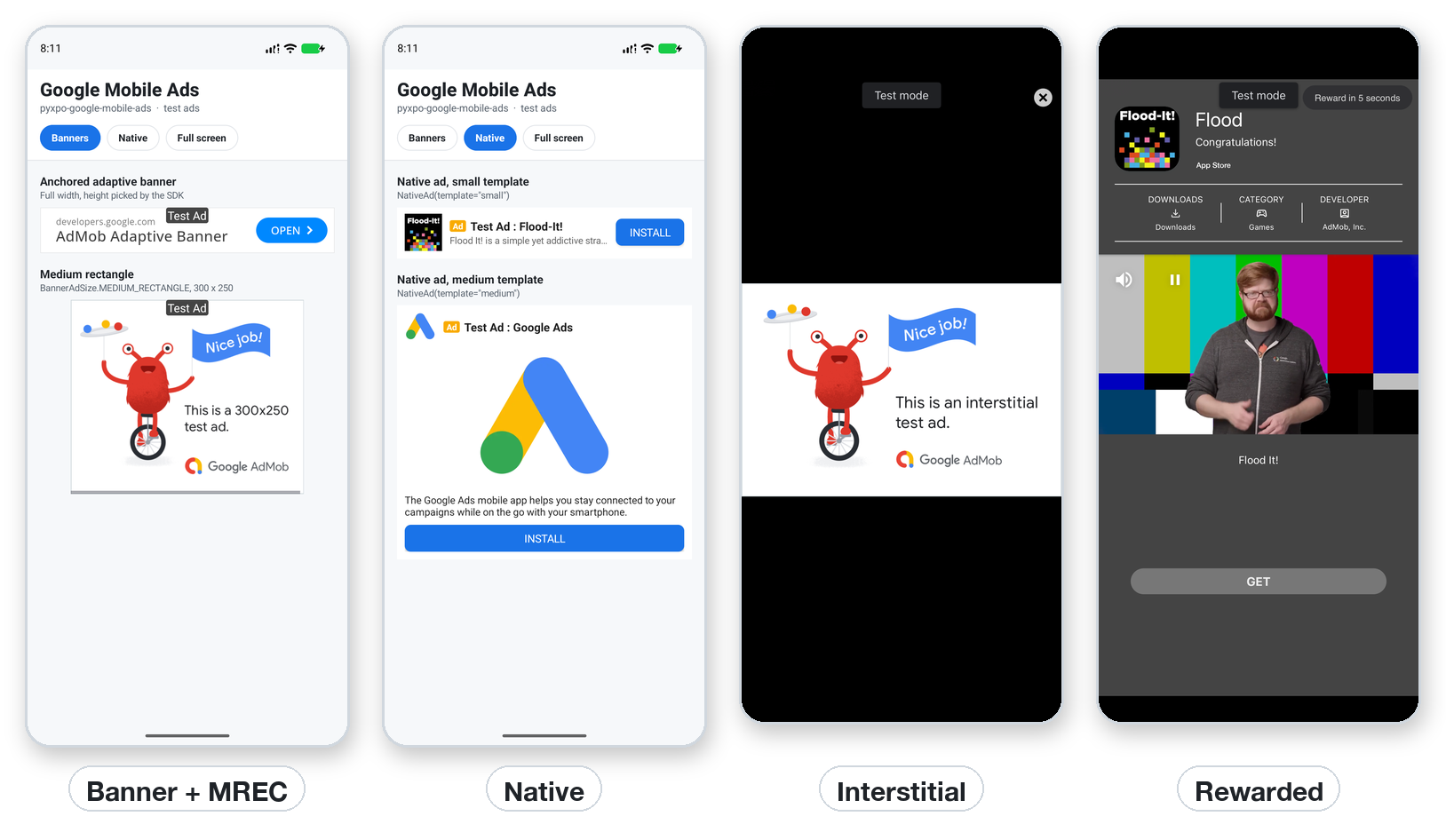
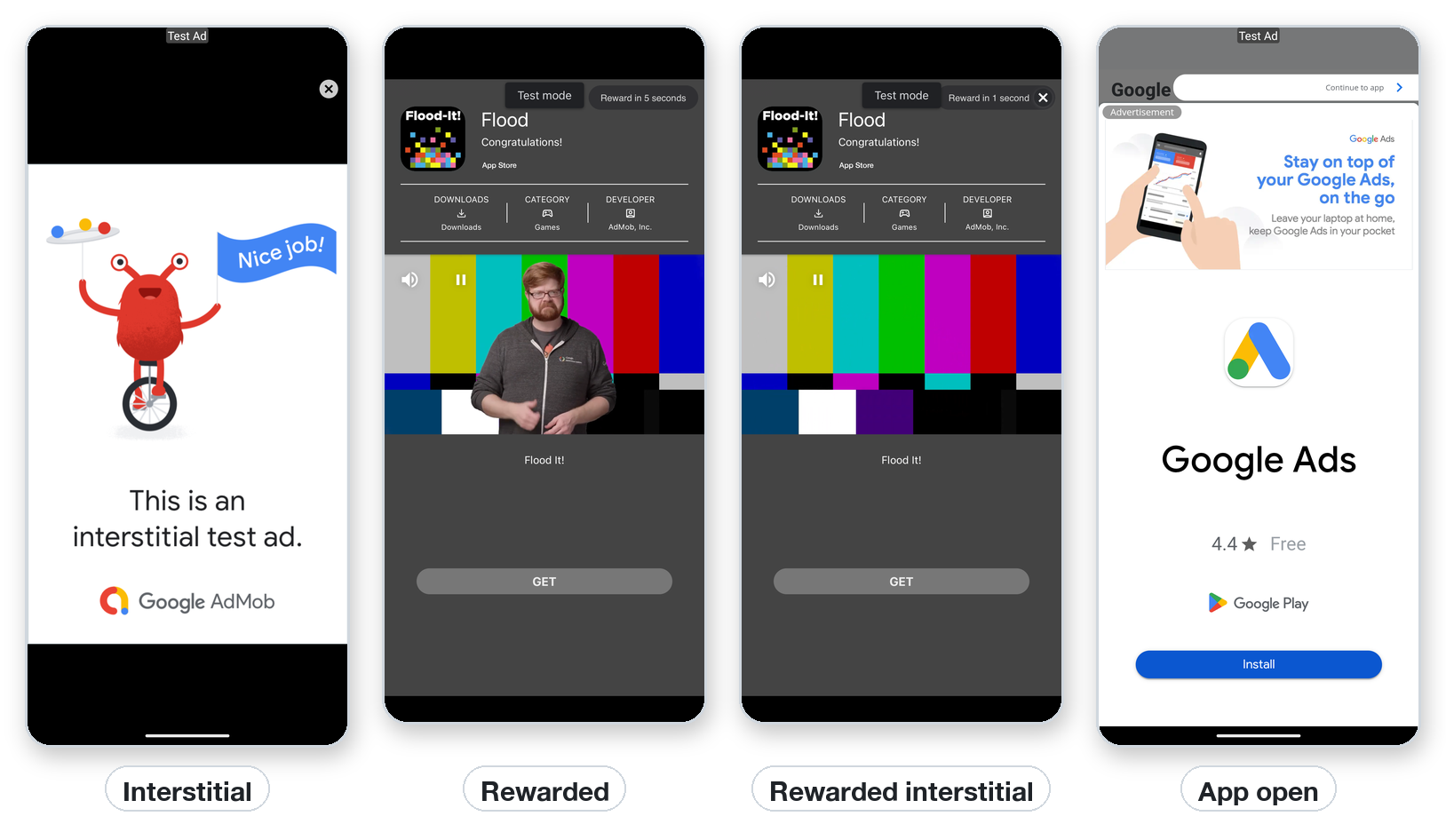
Google AdMob ads for Android and iOS: banner (adaptive and fixed sizes), native (small and medium templates drawn natively), interstitial, rewarded, rewarded interstitial and app open. Full-screen ads come as plain objects with load_async and show_async, or as hooks that preload, re-render and load the next ad after each show. show_async never raises, no request goes out before initialize_async, and an expired ad is never shown. Google's UMP consent form, the request settings for apps for children and simulated test ads on the web and desktop are built in.
- pyxpo-google-mobile-ads
- v0.1.0a1
- Native: Swift + Kotlin
- Like react-native-google-mobile-ads
Install
Install the package into the same environment as pyxpo.
Add google-mobile-ads to modules in your app config, then import it in your code.
[tool.pyxpo]
modules = ["google-mobile-ads"]import pyxpo_google_mobile_ads as AdsNeeds Python 3.9+ and pyxpo>=0.1.0a4.
This module has native code. After you add it, run pyxpo run or pyxpo build again so it is compiled into the app. Hot reload alone is not enough.
Platforms
Quick start
import pyxpo_google_mobile_ads as Ads
from pyxpo import Pressable, Text, View, component, use_async


async def start_ads():
    Ads.set_request_configuration(max_ad_content_rating=Ads.MaxAdContentRating.PG)
    try:
        await Ads.consent.request_info_async()           # every start; fast when nothing changed
        await Ads.consent.show_form_if_required_async()  # shows only where the law asks for it
    except Ads.AdError as e:
        print("consent:", e)                             # e.g. no network: try again on the next start
    if Ads.consent.can_request_ads():
        await Ads.initialize_async()                     # ads wait for this, then load


@component
def App():
    use_async(start_ads, [])                             # once, when the app mounts
    bonus = Ads.use_rewarded_ad(Ads.TestIds.REWARDED)    # preloads; re-renders when it is ready

    async def watch():
        result = await bonus.show_async()
        if result.reward:
            print("earned", result.reward.amount, result.reward.type)

    return View(
        Text("My app", style={"font_size": 24}),
        Pressable(Text("Watch an ad for 10 coins"), on_press=watch, disabled=not bonus.loaded),
        View(style={"flex": 1}),
        Ads.BannerAd(Ads.TestIds.ADAPTIVE_BANNER),      # anchored adaptive banner at the bottom
        style={"flex": 1},
    )
Configuration
Config plugin
pyxpo_google_mobile_ads.plugin writes the AdMob app ID, SKAdNetwork IDs and the tracking prompt into the native projects at build time. Leave the app IDs out while developing: Google's test app IDs are used then. App IDs have a ~, ad unit IDs a /. A wrong ID, an unknown option or a badly formed SKAdNetwork ID fails the build. Rebuild after adding the module.
[tool.pyxpo]
modules = ["google-mobile-ads"]
plugins = [
  ["pyxpo_google_mobile_ads.plugin", {
    androidAppId = "ca-app-pub-XXXXXXXXXXXXXXXX~YYYYYYYYYY",
    iosAppId = "ca-app-pub-XXXXXXXXXXXXXXXX~ZZZZZZZZZZ",
  }],
]| Option | Type | Default | What it does |
|---|---|---|---|
androidAppId | str | Google's Android test app ID | com.google.android.gms.ads.APPLICATION_ID in AndroidManifest.xml. |
iosAppId | str | Google's iOS test app ID | GADApplicationIdentifier in Info.plist. |
userTrackingUsageDescription | str | none | NSUserTrackingUsageDescription, needed for request_tracking_async(). |
skAdNetworkItems | list[str] | ["cstr6suwn9.skadnetwork"] | SKAdNetworkItems in Info.plist. Add Google's full third-party list before an App Store release. |
delayAppMeasurementInit | bool | false | Keeps Google's app measurement off until initialize_async(). |
removeAdIdPermission | bool | false | Removes the AD_ID permission (Play Families policy). |
Permissions
pyxpo adds these to Info.plist and AndroidManifest.xml for you when the module is listed.
| iOS | None to show ads. Add userTrackingUsageDescription only if you call request_tracking_async(). |
|---|---|
| Android | None to add. The SDK merges its network and AD_ID permissions; removeAdIdPermission drops AD_ID. |
API reference
Setup
set_request_configuration(*, test_device_ids=None, tag_for_child_directed_treatment=None, tag_for_under_age_of_consent=None, max_ad_content_rating=None)→ NoneSettings for every request. None keeps the current value. Either child tag makes every request non-personalized.
get_request_configuration()→ dictThe current settings.
await initialize_async()→ dictStarts the SDK. Returns {adapter: {"state", "description", "latency"}}. Safe to call again. Ads created before it wait for it.
is_available()→ boolTrue on Android and iOS, and on the web and desktop (simulated). False on Mac Catalyst and Windows.
await request_tracking_async()→ striOS ATT prompt: "authorized", "denied", "restricted" or "not_determined"; "unavailable" elsewhere.
await get_tracking_status_async()→ strThe ATT status, without a prompt.
await open_ad_inspector_async()Google's Ad Inspector, on test devices.
is_test_id(unit_id)→ boolTrue for Google's test unit IDs.
Consent: Ads.consent
Google's User Messaging Platform. Create a GDPR (and US states) message in AdMob > Privacy & messaging; without one no form shows. On the web, desktop and platforms without ads, consent reports not_required.
await request_info_async(*, debug_geography=None, test_device_ids=None, tag_for_under_age_of_consent=None)→ dictRefresh from Google on every start. debug_geography: "eea", "regulated_us_state", "other" or "disabled".
await show_form_if_required_async()→ dictShows the form only where it is needed.
await show_privacy_options_form_async()→ dictLets the user change their choice. Offer it when privacy_options_required is True.
info()→ dict{"status", "can_request_ads", "privacy_options_required", "form_available"}
can_request_ads()→ boolCheck before initialize_async().
await reset_async()Forget the stored consent (testing only).
Views
Adaptive banners and native ads have height 0 until an ad loads, so a no-fill leaves no gap. Where ads are not available they render nothing.
BannerAd(unit_id, size=BannerAdSize.ANCHORED_ADAPTIVE_BANNER, *, request_options, max_height, on_load, on_error, on_open, on_close, on_click, on_impression, on_paid, style, key)size is a BannerAdSize or "WxH" (32 to 2048). on_load gets {"width", "height"}, on_error an AdError, on_paid {"value_micros", "currency_code", "precision"}. max_height caps an inline adaptive banner.
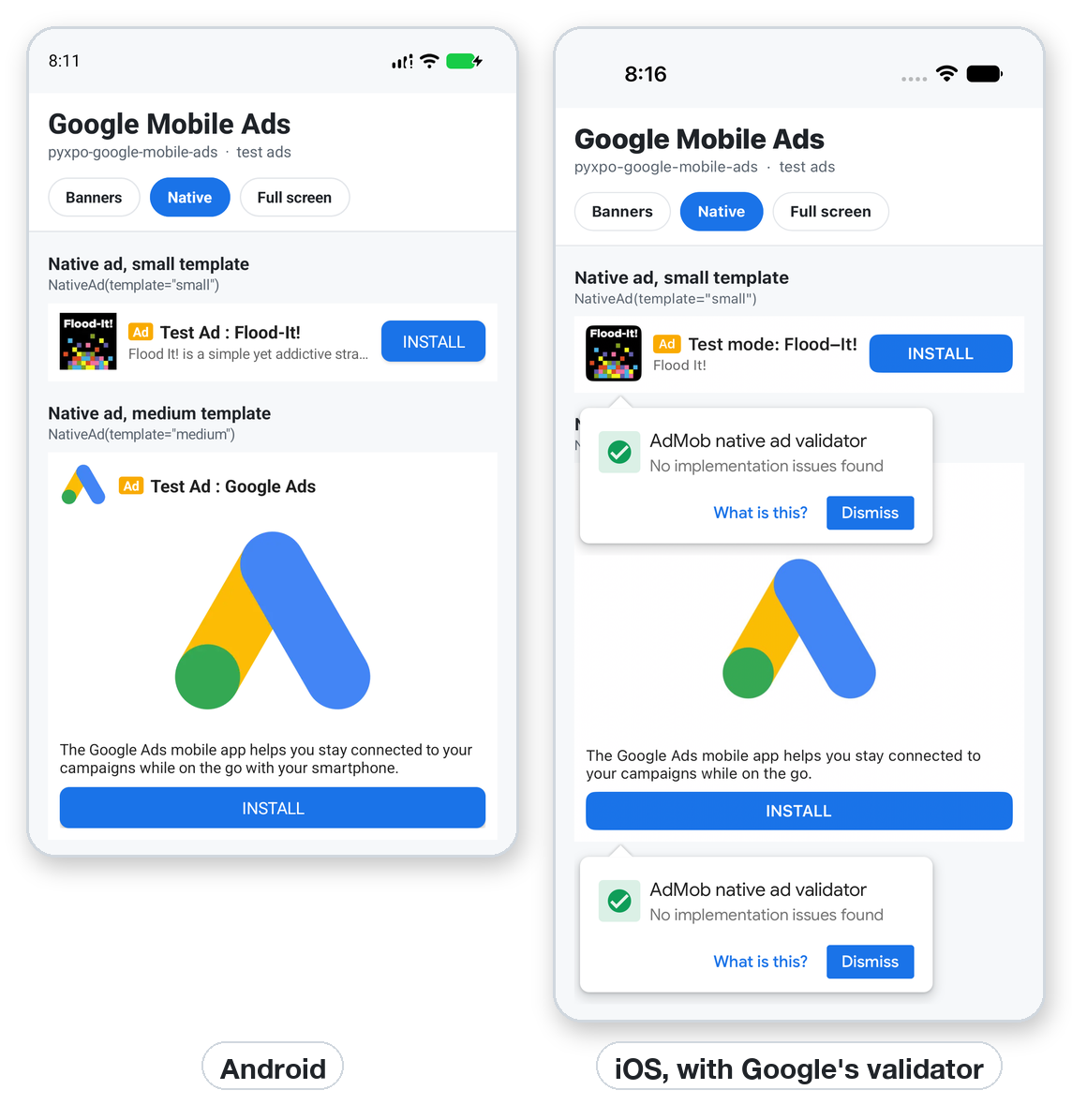
NativeAd(unit_id, template="medium", *, request_options, background_color, text_color, button_color, button_text_color, on_load, on_error, on_click, on_impression, on_paid, style, key)"small" (about 96 high: icon, headline, rating, button) or "medium" (about 330 high: adds the media view and body). The Ad badge and AdChoices icon always show.
Full-screen ads
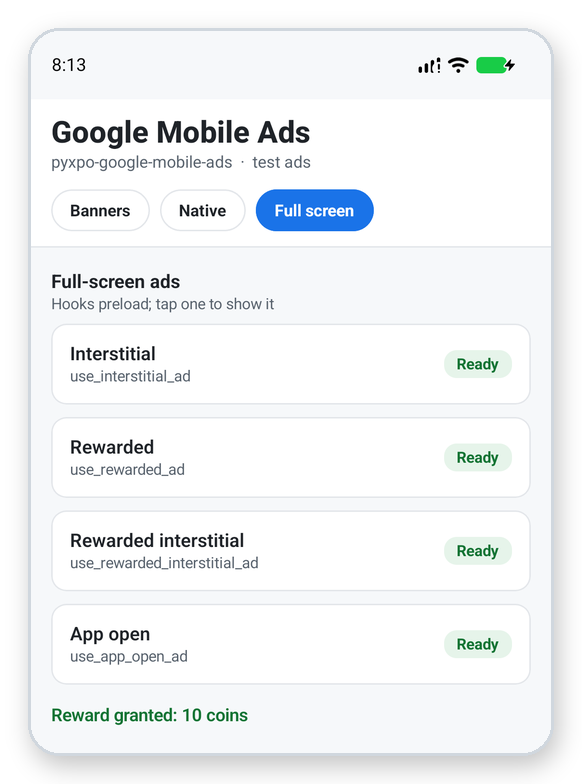
InterstitialAd, RewardedAd, RewardedInterstitialAd and AppOpenAd. A loaded ad is good for 1 hour (app open: 4 hours). Only one full-screen ad shows at a time.
Cls(unit_id, request_options=None, *, immersive=False)Rewarded types also take user_id= and custom_data= (strings up to 1024 characters) for server-side verification. immersive=True hides the Android system bars.
await ad.load_async()→ NoneReturns at once if already loaded and joins a load in progress. Raises AdError.
await ad.show_async()→ ShowResultReturns when the user closes the ad. Never raises.
ad.loaded, ad.loading, ad.showing, ad.errorState. loaded turns False when the ad expires.
ad.add_listener(event, fn)→ subscriptionAny AdEventType. sub.remove() stops it.
ad.remove_all_listeners(), ad.destroy()→ NoneClean up the listeners, or release the SDK ad.
Hooks
Each hook loads on mount, re-renders on loaded / loading / error changes, loads the next ad after each show and releases the ad on unmount. camelCase names (useRewardedAd, ...) work too.
use_interstitial_ad(unit_id, request_options=None, *, preload=True, reload=True, immersive=False)→ AdHandleAn interstitial, shown at a natural break.
use_rewarded_ad(..., user_id=None, custom_data=None), use_rewarded_interstitial_ad(...)→ AdHandleRewarded ads. The reward type and amount are set on the ad unit in AdMob.
use_app_open_ad(unit_id, request_options=None, *, preload=True, reload=True)→ AdHandleAn app open ad.
AdHandleloaded, loading, error (the AdError of the last failed load), reward (of the last show), ad (the ad object), load(), show_async().
Types and constants
ShowResult(shown, error=None, reward=None)What show_async returns. reward is None when the user closed a rewarded ad early.
Reward(type, amount)The reward of a rewarded ad.
AdError(code, message="", sdk_code=None, domain="")An Exception. code: no_fill, network, timeout, invalid_request, app_id_missing, unavailable, not_loaded, expired, already_showing, busy, already_used, not_ready, app_not_foreground or internal.
TestIdsAPP_ID, BANNER, ADAPTIVE_BANNER, INTERSTITIAL, REWARDED, REWARDED_INTERSTITIAL, APP_OPEN, NATIVE, for the running platform.
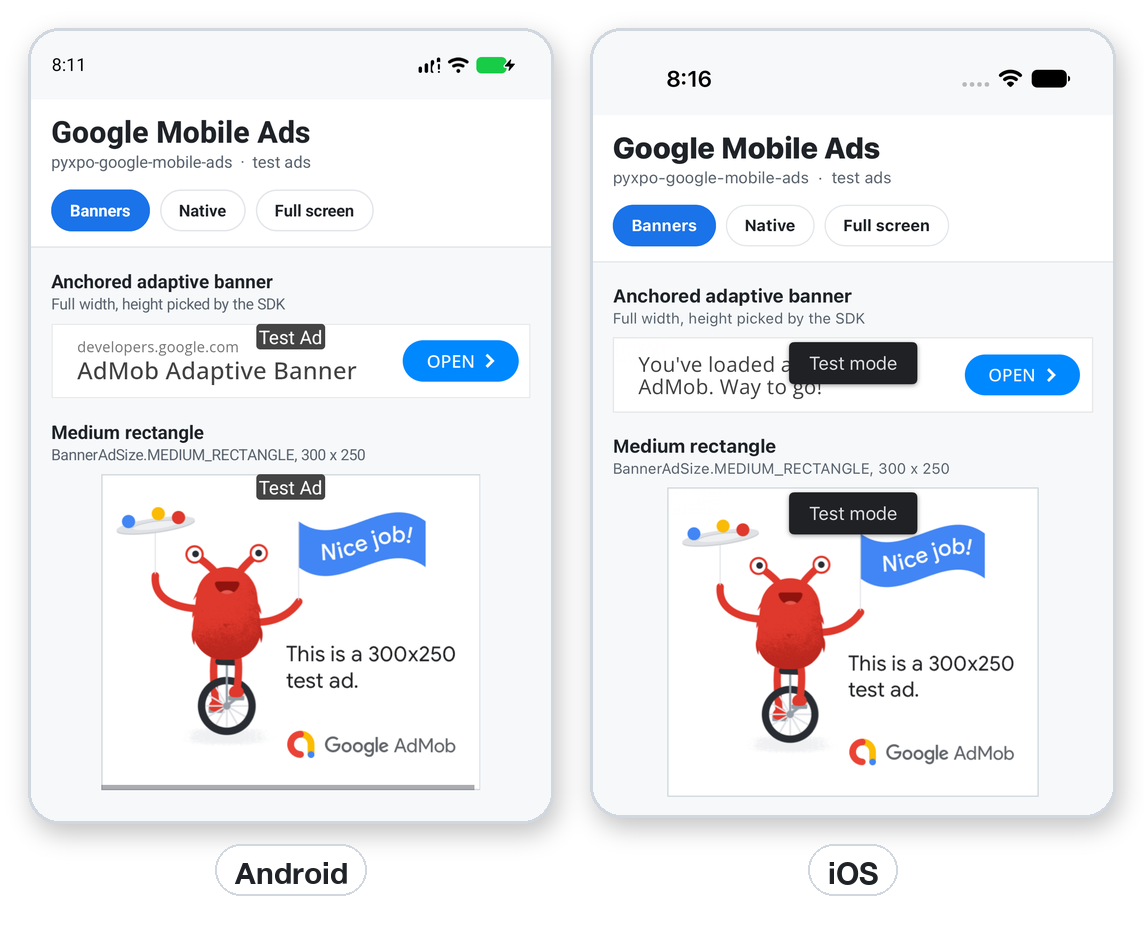
BannerAdSizeANCHORED_ADAPTIVE_BANNER, INLINE_ADAPTIVE_BANNER, BANNER (320x50), LARGE_BANNER (320x100), MEDIUM_RECTANGLE (300x250), FULL_BANNER (468x60), LEADERBOARD (728x90).
AdEventTypeLOADED, FAILED, OPENED, IMPRESSION, CLICKED, CLOSED, SHOW_FAILED, EARNED_REWARD, PAID.
MaxAdContentRating, ConsentStatusG, PG, T, MA / UNKNOWN, REQUIRED, NOT_REQUIRED, OBTAINED.
request_optionsPer-request dict, the second argument of the classes and hooks or request_options= on views: keywords, content_url, neighboring_content_urls, non_personalized. Unknown keys raise ValueError.
Examples
Banner sizes
Adaptive sizes take the container's width. Fixed sizes keep their box from the start, so the layout does not jump.
import pyxpo_google_mobile_ads as Ads
from pyxpo import View

Ads.BannerAd(Ads.TestIds.ADAPTIVE_BANNER)                                          # anchored adaptive (default)
Ads.BannerAd(Ads.TestIds.ADAPTIVE_BANNER, size=Ads.BannerAdSize.INLINE_ADAPTIVE_BANNER, max_height=120)
View(Ads.BannerAd(Ads.TestIds.BANNER, size=Ads.BannerAdSize.MEDIUM_RECTANGLE),     # 300 x 250, centered
     style={"align_items": "center"})
Ads.BannerAd(Ads.TestIds.BANNER, size="320x60",                                    # custom WIDTHxHEIGHT
             on_error=lambda e: print("no banner:", e.code))
Native ads
Drawn with native views from Google's template layouts and themed with colors. With a test unit, Google's native ad validator may pop up over the ad; "No implementation issues found" is the result to look for.
import pyxpo_google_mobile_ads as Ads

Ads.NativeAd(Ads.TestIds.NATIVE, template="small")
Ads.NativeAd(
    Ads.TestIds.NATIVE,
    template="medium",
    background_color="#ffffff",
    text_color="#1f2328",
    button_color="#1a73e8",
    button_text_color="#ffffff",
)
Rewarded ad with a hook
The hook preloads, re-renders when the ad is ready and loads the next one after each show.
import pyxpo_google_mobile_ads as Ads
from pyxpo import Pressable, Text, View, component, use_state


@component
def Shop():
    ad = Ads.use_rewarded_ad(Ads.TestIds.REWARDED)
    coins, set_coins = use_state(0)

    async def watch():
        result = await ad.show_async()
        if result.reward:                     # None when the user closed it early
            set_coins(lambda c: c + result.reward.amount)

    return View(
        Text("Coins: %d" % coins),
        Pressable(Text("Watch a video: +10 coins" if ad.loaded else "Loading..."),
                  on_press=watch, disabled=not ad.loaded),
    )
Full-screen ad objects
Outside components, use the classes directly. One object can be loaded and shown again and again. An ad must never block the app: catch AdError around load_async and check result.shown.
import pyxpo_google_mobile_ads as Ads

ad = Ads.InterstitialAd(Ads.TestIds.INTERSTITIAL, {"non_personalized": True})


async def preload():
    try:
        await ad.load_async()            # returns at once if already loaded; joins a load in progress
    except Ads.AdError as e:
        print("no ad this time:", e.code)


async def at_a_break():
    if not ad.loaded:
        return                           # never make the user wait for an ad
    result = await ad.show_async()       # never raises
    if result.error:
        print("not shown:", result.error.code)
    await preload()                      # one SDK ad shows once; load the next
Apps for children
For Google Play's Families policy, Apple's Kids Category and COPPA. Also add removeAdIdPermission = true to the plugin options, and do not call request_tracking_async().
import pyxpo_google_mobile_ads as Ads


async def start_ads():
    Ads.set_request_configuration(
        tag_for_child_directed_treatment=True,       # COPPA: no personalized ads, no remarketing
        tag_for_under_age_of_consent=True,           # GDPR: treat users as children
        max_ad_content_rating=Ads.MaxAdContentRating.G,
    )
    await Ads.consent.request_info_async(tag_for_under_age_of_consent=True)
    await Ads.initialize_async()
Recipe: an interstitial with a frequency cap
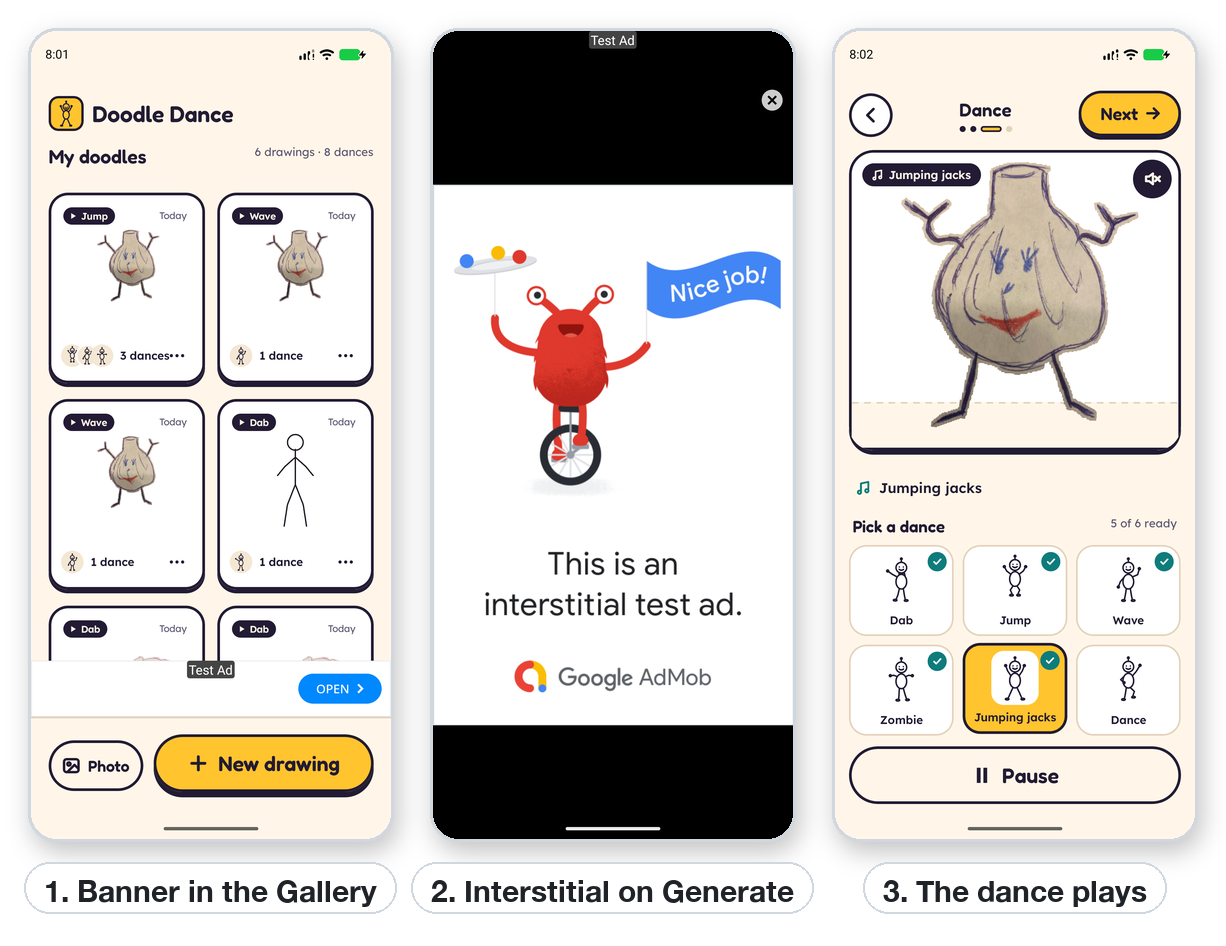
Doodle Dance, a pyxpo app for children, shows a banner under the gallery and an interstitial now and then on Generate. The cap is plain Python, so it can be unit tested with a fake clock. asyncio.shield keeps the timeout from cancelling the shared load.
import asyncio
import time

import pyxpo_google_mobile_ads as Ads

WAIT = 1.5   # seconds to wait for an ad that is still loading; after that, skip it


class Cap:
    """No ad on the first tap of a session, then every `every`-th tap, never within `gap` seconds."""

    def __init__(self, first=2, every=3, gap=120.0, clock=time.monotonic):
        self.first, self.every, self.gap, self.clock = first, every, gap, clock
        self.taps, self.last = 0, None

    def tap(self):
        self.taps += 1
        if self.taps < (self.first if self.last is None else self.every):
            return False
        return self.last is None or self.clock() - self.last >= self.gap

    def shown(self):
        self.taps, self.last = 0, self.clock()


cap = Cap()
ad = Ads.InterstitialAd(Ads.TestIds.INTERSTITIAL, {"non_personalized": True})


async def on_generate():
    if not Ads.is_available() or not cap.tap():
        return
    if not ad.loaded:
        try:
            await asyncio.wait_for(asyncio.shield(ad.load_async()), WAIT)
        except (asyncio.TimeoutError, Ads.AdError):
            return                             # still due: the next tap tries again
    if (await ad.show_async()).shown:
        cap.shown()
Good to know
- While developing, always use Ads.TestIds. Test ads always fill and are safe to click. Clicking your own live ads breaks AdMob policy; add your phone as a test device with set_request_configuration(test_device_ids=[...]) to try real units.
- Run setup with use_async(start_ads, []). use_effect(lambda: start_ads(), []) creates a coroutine that never runs.
- On the web and the desktop window, only TestIds units fill, with simulated ads. Real unit IDs raise AdError("unavailable") there.
- no_fill is normal, especially for new ad units, which can take up to an hour to start filling.
- Before an App Store release, add Google's full SKAdNetwork list, host app-ads.txt, and publish the consent message in AdMob.
- Mediation adapters and custom native layouts are not supported yet.