 pyxpo
pyxpoFetch
Make HTTP requests with the API you know from the web: fetch(url, method=, headers=, body=) returns a Response with status, ok, headers, text(), json() and bytes(). Stream the body chunk by chunk for server-sent events, LLM replies or big downloads, stop a request with an AbortController, and control timeouts, redirects and cookies. HTTP 404 and 500 do not raise; network failures raise FetchError. Requests run on OkHttp on Android and URLSession on iOS, off the UI thread.
- pyxpo-fetch
- v0.1.0a1
- Native: Swift + Kotlin
- Like expo/fetch
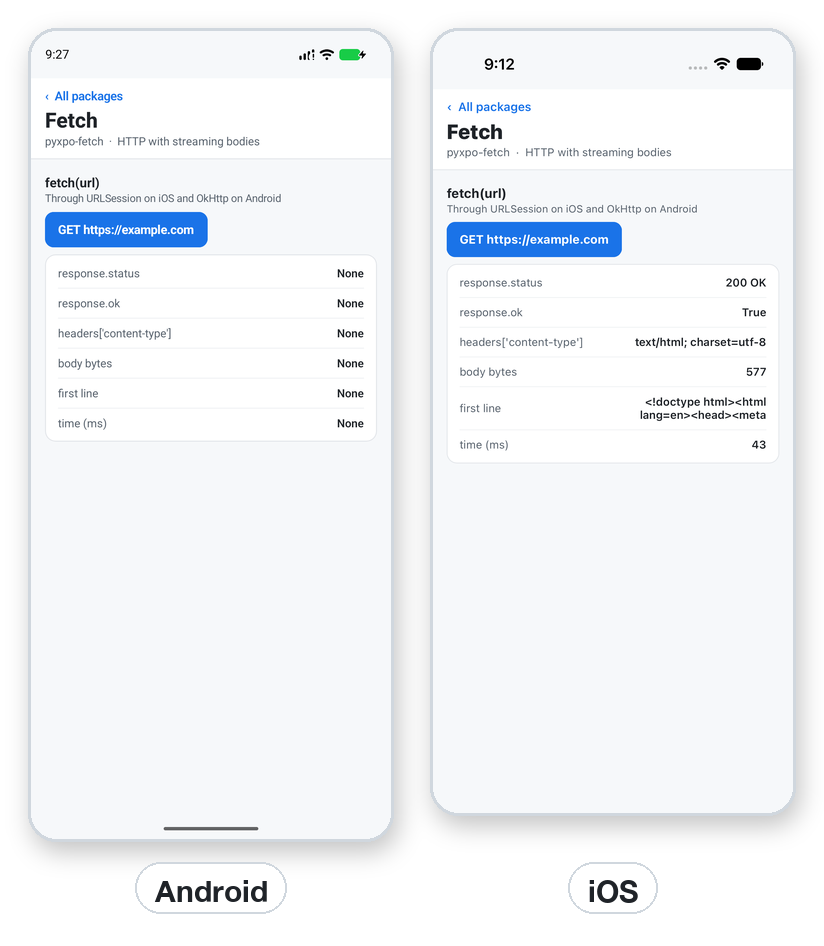
Install
Install the package into the same environment as pyxpo.
Add fetch to modules in your app config, then import it in your code.
[tool.pyxpo]
modules = ["fetch"]from pyxpo_fetch import FetchError, fetchNeeds Python 3.9+ and pyxpo>=0.1.0a2.
This module has native code. After you add it, run pyxpo run or pyxpo build again so it is compiled into the app. Hot reload alone is not enough.
Platforms
Quick start
from pyxpo import Button, Text, View, component, use_async, use_state
from pyxpo_fetch import FetchError, fetch


@component
def Hello():
    taps, set_taps = use_state(0)
    line, set_line = use_state("Press the button")

    async def go():
        if taps == 0:
            return
        try:
            resp = await fetch("https://example.com/", timeout=10)
            text = await resp.text()
            set_line("%s %s, %d bytes" % (resp.status, resp.status_text, len(text)))
        except FetchError as e:
            set_line("Offline? %s" % e)

    use_async(go, [taps])
    return View(Text(line), Button("GET example.com", lambda: set_taps(taps + 1)))
Permissions
pyxpo adds these to Info.plist and AndroidManifest.xml for you when the module is listed.
| iOS | None. Plain http:// needs the server to be allowed by the app (pyxpo apps allow local hosts), so prefer https://. |
|---|---|
| Android | INTERNET, added by the module. |
API reference
fetch
Start a request from a button with a counter in state and use_async(go, [counter]). A lambda: go() only builds a coroutine that nobody awaits.
await fetch(url, *, method="GET", headers=None, body=None, redirect="follow", credentials="include", signal=None, timeout=None)→ ResponseReturns once the headers arrive. url must be http:// or https://. method is upper-cased for you.
bodystr (UTF-8; Content-Type defaults to text/plain;charset=UTF-8) or bytes. Dicts are not accepted, use json.dumps. GET and HEAD cannot have a body.
headersA dict, a list of pairs, or a Headers object.
redirect"follow" (default); "manual" returns the 3xx response itself; "error" raises FetchError.
credentials"include" (default) sends and stores cookies; "omit" turns them off; "same-origin" acts like include.
signal, timeoutAn AbortController().signal, and a timeout in seconds.
Response
camelCase aliases work too: statusText, bodyUsed, arrayBuffer.
status, status_text, ok→ int, str, boolok is True for 200 to 299.
headers→ HeadersThe response headers.
url, redirected→ str, boolThe final URL, and whether a redirect led there.
await text() / json() / bytes() / array_buffer()Read the whole body.
body→ async iterator of bytesasync for chunk in resp.body. Stop early with await resp.body.cancel().
body_used→ boolA body can be read only once. A second read raises RuntimeError.
Headers and abort
Headers(init=None)Case-insensitive. append, set, delete, get, get_all, get_set_cookie, has, keys, items, and name in headers. Repeated values join as the web does.
AbortController()signal, and abort(reason=None). The awaiting call raises AbortError.
AbortSignalaborted, reason, throw_if_aborted(). An already aborted signal raises AbortError before the request starts.
Types
Results and options are plain Python dicts with these keys.
Errors
| Key | Type | Description |
|---|---|---|
FetchError | Exception | No connection, DNS, TLS, timeout, a refused redirect, or a body that breaks off. Show a retry; do not assume the server saw the request. |
AbortError | FetchError | The signal was aborted. Usually nothing to do. |
ValueError | bad call | Bad redirect or credentials, a non-http(s) URL, or a body on GET or HEAD. |
TypeError | bad body | body is not str or bytes. Use json.dumps(...). |
RuntimeError | body read twice | Read it once and keep the result. |
ModuleNotLinkedError | pyxpo.module_api | "fetch" is missing from modules. Add it and rebuild. |
resp.ok is False | not an error | The server answered 4xx or 5xx. Check resp.status and read the body for the reason. |
Examples
Send JSON
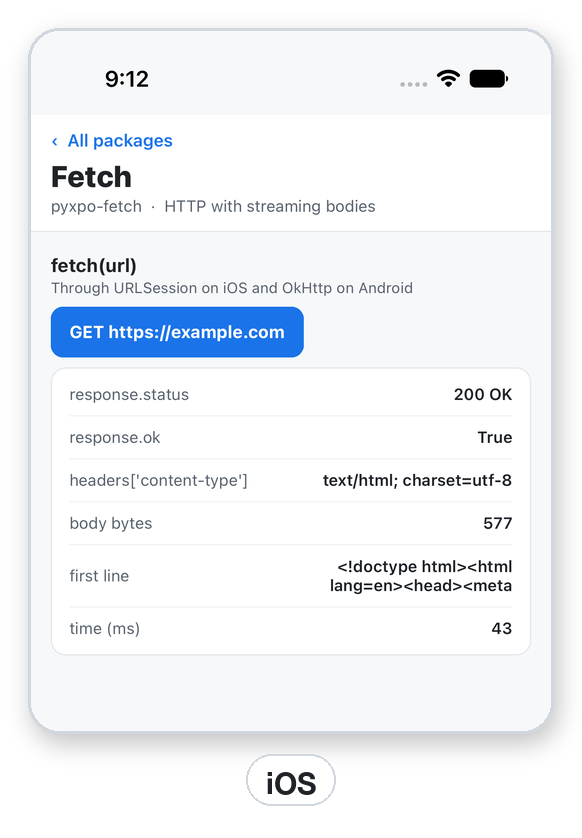
The screenshot is from iOS. The Android emulator used had no internet, so its request ended in a FetchError, which is what a phone in airplane mode gives.
import json

from pyxpo_fetch import fetch


async def add_item(token: str) -> dict:
    resp = await fetch(
        "https://api.example.com/items",
        method="POST",
        headers={"Content-Type": "application/json", "Authorization": "Bearer " + token},
        body=json.dumps({"name": "pen"}),
    )
    return await resp.json()
Stream and abort
On iOS URLSession holds back the first 512 bytes for MIME sniffing, so a streaming server should send X-Content-Type-Options: nosniff or a type such as text/event-stream.
import asyncio

from pyxpo_fetch import AbortController, AbortError, fetch


async def read_events(handle):
    resp = await fetch("https://example.com/events")
    async for chunk in resp.body:
        handle(chunk)          # bytes, as they arrive


async def slow_call(url):
    ctl = AbortController()
    task = asyncio.ensure_future(fetch(url, signal=ctl.signal))
    await asyncio.sleep(5)
    ctl.abort()
    try:
        return await task
    except AbortError:
        return None
Recipe: a search box
Look up what the user types in a JSON API, with a timeout and clear messages when it fails.
from urllib.parse import quote

from pyxpo import Text, TextInput, View, component, use_async, use_state
from pyxpo_fetch import FetchError, fetch


@component
def Search():
    q, set_q = use_state("")
    result, set_result = use_state("")

    async def look_up():
        if len(q) < 2:
            set_result("")
            return
        try:
            resp = await fetch("https://api.example.com/search?q=" + quote(q), timeout=8)
            if not resp.ok:
                set_result("Server said %d" % resp.status)
                return
            data = await resp.json()
            set_result(", ".join(item["name"] for item in data.get("items", [])))
        except FetchError as e:
            set_result("Could not search: %s" % e)

    use_async(look_up, [q])
    return View(TextInput(value=q, on_change_text=set_q, placeholder="Search"), Text(result))
Testing
Headers and the argument checks run without a device. Replace fetch with a fake for the rest.
import asyncio

import pytest
import pyxpo_fetch as mod
from pyxpo_fetch import Headers


def test_headers_case_insensitive():
    h = Headers({"Content-Type": "text/plain"})
    h.append("Set-Cookie", "a=1")
    h.append("set-cookie", "b=2")
    assert h.get("content-type") == "text/plain"
    assert h.get_set_cookie() == ["a=1", "b=2"]


def test_validation():
    with pytest.raises(ValueError):
        asyncio.run(mod.fetch("ftp://x.test/"))
    with pytest.raises(ValueError):
        asyncio.run(mod.fetch("https://x.test/", method="GET", body="x"))
Good to know
- No module options and no config plugin. On Android the module adds OkHttp 4.12.
- A 404 does not raise. Check resp.ok or resp.status.
- To upload a file, send its bytes as body.
- If the Android emulator gives FetchError, it has no internet. Check its network or test on a phone.
- There is no fetch on the web page yet. If you need it today, wrap the call and offer a fallback.