 pyxpo
pyxpoNotifications
Ask permission, schedule a notification for now or later (after N seconds, at a date, daily, weekly, monthly, yearly or by calendar fields), decide how to show one while the app is open, react to taps, manage Android channels, and receive push through APNs on iOS and Firebase Cloud Messaging on Android. iOS uses UserNotifications; Android posts with NotificationManager and schedules with AlarmManager. snake_case and the Expo camelCase names both work.
- pyxpo-notifications
- v0.1.0a2
- Native: Swift + Kotlin
- Like expo-notifications
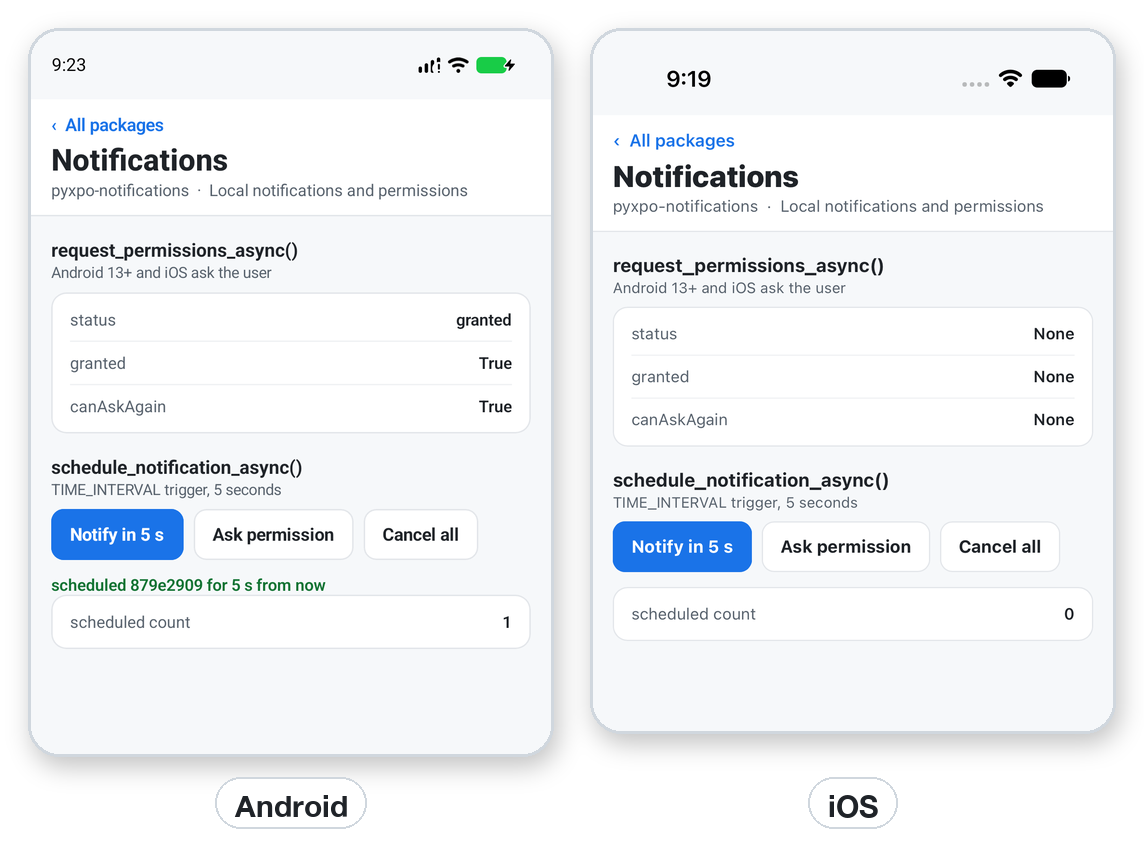
Install
Install the package into the same environment as pyxpo.
Add notifications to modules in your app config, then import it in your code.
[tool.pyxpo]
modules = ["notifications"]import pyxpo_notifications as NotificationsNeeds Python 3.9+ and pyxpo>=0.1.0a2.
This module has native code. After you add it, run pyxpo run or pyxpo build again so it is compiled into the app. Hot reload alone is not enough.
Platforms
Quick start
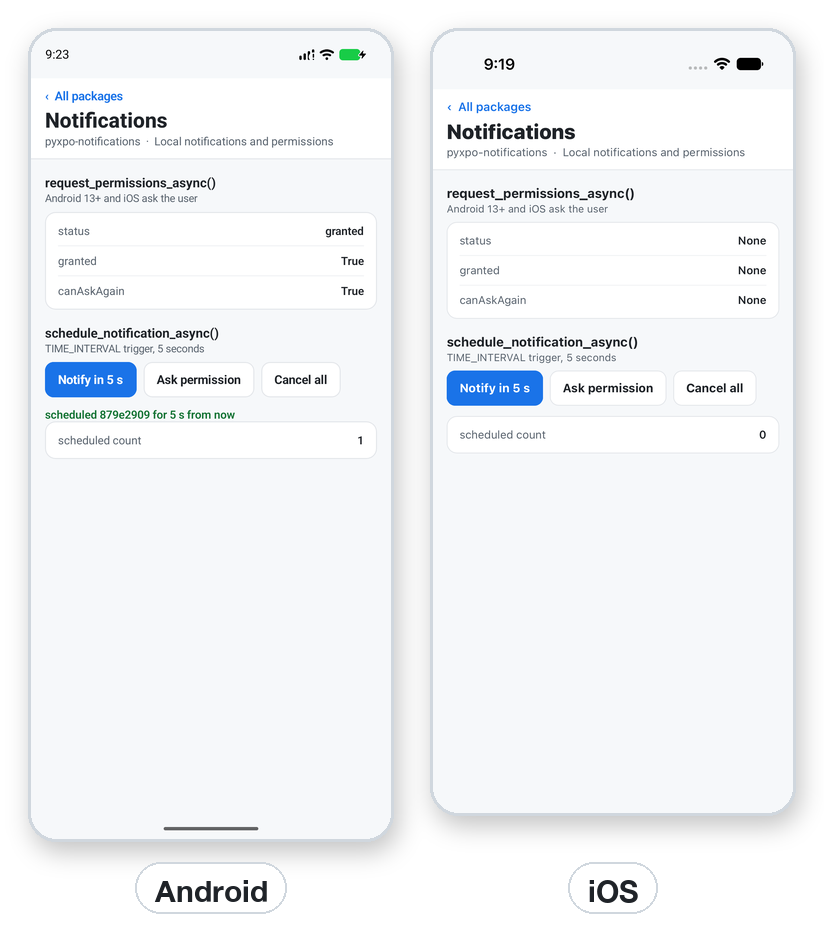
from pyxpo import Button, Text, View, component, use_async, use_state
import pyxpo_notifications as Notifications

Notifications.set_notification_handler({
    "handle_notification": lambda n: {"should_show_banner": True, "should_show_list": True,
                                      "should_play_sound": False, "should_set_badge": False},
})


@component
def Reminder():
    taps, set_taps = use_state(0)
    status, set_status = use_state("Not scheduled")

    async def run():
        if taps == 0:
            return
        perm = await Notifications.request_permissions_async()
        if not perm["granted"]:
            set_status("Permission denied")
            return
        nid = await Notifications.schedule_notification_async({
            "content": {"title": "Tea is ready", "body": "Your 2nd cup", "data": {"cup": 2}},
            "trigger": {"type": Notifications.SchedulableTriggerInputTypes.TIME_INTERVAL, "seconds": 5},
        })
        set_status("Scheduled %s for 5 seconds from now" % nid[:8])

    use_async(run, [taps])

    return View(Text(status), Button("Notify me in 5 s", lambda: set_taps(taps + 1)))
Configuration
Exact alarms on Android
Local notifications need no config. Android alarms are inexact and may be batched; for exact timing on Android 12+, add the permission yourself.
[tool.pyxpo.android]
permissions = ["android.permission.SCHEDULE_EXACT_ALARM"]
Remote push plugin
For push, add the config plugin. google-services.json from the Firebase console holds no secrets, but keep the Firebase service account key that sends pushes out of the app and the repo.
[tool.pyxpo]
modules = ["notifications"]
plugins = [["pyxpo_notifications.plugin", { googleServicesFile = "./google-services.json" }]]| Option | Type | Default | What it does |
|---|---|---|---|
googleServicesFile | str | none | The google-services.json from the Firebase console. Without it Android has no FCM token. |
mode | str | "development" | iOS aps-environment: "development" or "production". |
enableBackgroundRemoteNotifications | bool | false | iOS: adds remote-notification to the background modes. |
Permissions
pyxpo adds these to Info.plist and AndroidManifest.xml for you when the module is listed.
| iOS | None in Info.plist. request_permissions_async() shows the system prompt. |
|---|---|
| Android | POST_NOTIFICATIONS and RECEIVE_BOOT_COMPLETED are added for you. SCHEDULE_EXACT_ALARM is opt-in. |
API reference
Permission
await get_permissions_async()→ dictThe current permission, without asking.
await request_permissions_async(permissions=None)→ dictAsks if needed. {"status", "granted", "canAskAgain"} plus ios or android details. ios options: allow_alert, allow_badge, allow_sound (default True), allow_provisional, allow_critical_alerts, provide_app_notification_settings, allow_display_in_car_play.
use_permissions(get=True, request=False)→ (response, request, get)The permission as a hook.
Schedule and manage
await schedule_notification_async(request)→ strrequest is {"content", "trigger", "identifier"?}. Returns the identifier. Give your own identifier to replace a reminder. trigger None shows it now.
await get_next_trigger_date_async(trigger)→ int or NoneMilliseconds since 1970.
await get_all_scheduled_notifications_async()→ list[dict][{"identifier", "content", "trigger"}]
await cancel_scheduled_notification_async(id), cancel_all_scheduled_notifications_async()→ NoneCancel one or all schedules.
await get_presented_notifications_async()→ list[dict]Notifications still shown by the system.
await dismiss_notification_async(id), dismiss_all_notifications_async()→ NoneRemove shown notifications.
await get_badge_count_async(), set_badge_count_async(n)→ int / booliOS. On Android get returns 0 and set returns False.
Handler and taps
set_notification_handler(handler)→ None{"handle_notification", "handle_success", "handle_error"}. handle_notification may be async, has 3 seconds and returns should_show_banner, should_show_list, should_play_sound, should_set_badge. Without a handler nothing shows while the app is open. None removes it.
add_notification_received_listener(fn)→ SubscriptionEach notification that arrives while the app is open.
add_notification_response_received_listener(fn)→ SubscriptionTaps. A plain tap has actionIdentifier == DEFAULT_ACTION_IDENTIFIER. Subscription.remove() is safe to call twice.
await get_last_notification_response_async(), clear_last_notification_response_async()→ dict or NoneThe last tap, including the one that launched the app.
use_last_notification_response()→ dict or NoneNone until a tap, then the response.
Android channels
Android lets an app change only the name and description of an existing channel. On iOS these return None, [] or do nothing.
await set_notification_channel_async(id, channel)→ dictKeys: name, importance, description, sound ("default" or None), vibration_pattern, enable_vibrate, enable_lights, light_color, lockscreen_visibility, show_badge, bypass_dnd, group_id.
await get_notification_channels_async(), get_notification_channel_async(id), delete_notification_channel_async(id)List, read or delete channels.
Remote push
await get_device_push_token_async()→ {"type", "data"}type is "ios" (APNs) or "android" (FCM). Send data to your server.
add_push_token_listener(fn)→ SubscriptionCalled when the token changes.
await unregister_for_notifications_async()→ NoneStop receiving push.
await get_expo_push_token_async()Raises NotSupportedError: pyxpo does not use Expo's push service.
Constants
SchedulableTriggerInputTypes, AndroidImportance, AndroidNotificationVisibility, AndroidNotificationPriority, IosAuthorizationStatus, PermissionStatusEnums.
DEFAULT_ACTION_IDENTIFIERThe actionIdentifier of a plain tap.
Types
Requests are plain Python dicts. snake_case and camelCase keys both work; an unknown key raises ValueError.
content
| Key | Type | Description |
|---|---|---|
title, subtitle, body | str | Both platforms. |
data | dict | JSON-compatible; returned to you on tap. |
badge | int | iOS. From 0. |
sound | bool or str | True, "default", or a file name. |
sticky, auto_dismiss | bool | Android. |
priority | AndroidNotificationPriority | Android. MIN ... MAX. |
color | str | Android. "#RRGGBB" or "#RRGGBBAA". |
interruption_level | str | iOS. "passive", "active", "timeSensitive" or "critical". |
trigger
| Key | Type | Description |
|---|---|---|
TIME_INTERVAL | seconds, repeats | seconds > 0. iOS repeats only every 60 seconds or more. |
DATE | date | A datetime or milliseconds, in the future. A bare datetime or number works as the trigger. |
DAILY | hour, minute | Every day. |
WEEKLY | weekday, hour, minute | weekday 1 is Sunday. |
MONTHLY | day, hour, minute | Every month. |
YEARLY | month, day, hour, minute | month 0 is January. |
CALENDAR | year, month, day, weekday, hour, minute, second, repeats, timezone | iOS only. month 1 is January. |
channel_id | str | Add to any trigger to post on that Android channel. |
Examples
Triggers
A daily alarm, a date ten minutes from now, and the next fire date of a trigger.
from datetime import datetime, timedelta

import pyxpo_notifications as Notifications

T = Notifications.SchedulableTriggerInputTypes


async def schedule():
    await Notifications.schedule_notification_async({"content": {"title": "Wake up"},
                                                     "trigger": {"type": T.DAILY, "hour": 7, "minute": 30}})
    await Notifications.schedule_notification_async({"content": {"title": "Soon"},
                                                     "trigger": datetime.now() + timedelta(minutes=10)})
    return await Notifications.get_next_trigger_date_async({"type": T.TIME_INTERVAL, "seconds": 60})
Taps
Read data from the tap, including the tap that launched the app.
import pyxpo_notifications as Notifications

sub = Notifications.add_notification_response_received_listener(
    lambda r: print(r["notification"]["request"]["content"]["data"], r["actionIdentifier"]))


async def on_start():
    last = await Notifications.get_last_notification_response_async()
    if last:
        print("opened from", last["notification"]["request"]["identifier"])
        await Notifications.clear_last_notification_response_async()
Android channel
Create the channel once, then post on it with channel_id in the trigger.
import pyxpo_notifications as Notifications


async def setup():
    await Notifications.set_notification_channel_async("reminders", {
        "name": "Reminders",
        "importance": Notifications.AndroidImportance.HIGH,
        "vibration_pattern": [0, 250, 250, 250],
        "light_color": "#FF8800",
        "lockscreen_visibility": Notifications.AndroidNotificationVisibility.PUBLIC,
    })
    await Notifications.schedule_notification_async({
        "content": {"title": "Hi"}, "trigger": {"type": "timeInterval", "seconds": 5, "channel_id": "reminders"}})
Push token
Send the token to your server and push with APNs or FCM. A received push goes to the same listeners as a local notification, with trigger {"type": "push", ...}.
import pyxpo_notifications as Notifications


async def register():
    await Notifications.request_permissions_async()
    token = await Notifications.get_device_push_token_async()   # {"type": "ios" | "android", "data": "..."}
    Notifications.add_push_token_listener(lambda t: print("new token", t))
    return token
Recipe: daily reminder
A toggle that schedules or cancels one daily reminder with a fixed identifier.
from pyxpo import Button, Text, View, component, use_async, use_state
import pyxpo_notifications as Notifications

T = Notifications.SchedulableTriggerInputTypes
REMINDER_ID = "daily-water"


@component
def Water():
    taps, set_taps = use_state(0)
    on, set_on = use_state(False)

    async def run():
        if taps == 0:
            scheduled = await Notifications.get_all_scheduled_notifications_async()
            set_on(any(s["identifier"] == REMINDER_ID for s in scheduled))
            return
        if on:
            await Notifications.cancel_scheduled_notification_async(REMINDER_ID)
            set_on(False)
        else:
            perm = await Notifications.request_permissions_async()
            if perm["granted"]:
                await Notifications.schedule_notification_async({
                    "identifier": REMINDER_ID,
                    "content": {"title": "Drink water", "body": "A glass now"},
                    "trigger": {"type": T.DAILY, "hour": 10, "minute": 0},
                })
                set_on(True)

    use_async(run, [taps])
    return View(Text("Reminder is on" if on else "Reminder is off"),
                Button("Turn off" if on else "Turn on at 10:00", lambda: set_taps(taps + 1)))
Good to know
- A button handler of lambda: coroutine() is never awaited. Count taps in state and let use_async do the work, as in the quick start.
- Ask for permission at a moment the user understands, not at launch, and handle granted == False and canAskAgain == False.
- Firebase is needed only for remote push on Android. iOS push needs a real device or a signed simulator build.
- Categories, action buttons, attachments and custom sounds are not supported yet.
- On the desktop window, guard calls with from pyxpo.module_api import platform.