 pyxpo
pyxpoCamera
Show the camera preview in a CameraView you size with style: back or front camera, flash, torch, zoom, mirror and active. Take upright photos with quality, base64, EXIF and PNG or JPEG output, record videos with a duration or size limit, and scan 13 barcode types live in the preview or from an image file. Permission helpers for the camera and the microphone come with hooks. Android uses CameraX and the bundled ML Kit model, so no Google Play services are needed.
- pyxpo-camera
- v0.1.0a1
- Native: Swift + Kotlin
- Like expo-camera
Install
Install the package into the same environment as pyxpo.
Add camera to modules in your app config, then import it in your code.
[tool.pyxpo]
modules = ["camera"]import pyxpo_camera as CameraNeeds Python 3.9+ and pyxpo>=0.1.0a2.
This module has native code. After you add it, run pyxpo run or pyxpo build again so it is compiled into the app. Hot reload alone is not enough.
Platforms
Quick start
import pyxpo_camera as Camera
from pyxpo import Button, Text, View, component, use_async, use_ref, use_state


@component
def Snap():
    perm, request, _get = Camera.use_camera_permissions()
    cam = use_ref(None)
    taps, set_taps = use_state(0)
    shot, set_shot = use_state("")

    async def snap():
        if taps == 0 or cam.current is None:
            return
        photo = await cam.current.take_picture_async({"quality": 0.8})
        set_shot("%sx%s" % (photo["width"], photo["height"]))

    use_async(snap, [taps])
    if perm is None:
        return View()
    if not perm["granted"]:
        return Button("Allow the camera", request)
    return View(
        Camera.CameraView(ref=cam, facing="back", style={"flex": 1}),
        Text(shot),
        Button("Take a photo", lambda: set_taps(taps + 1)),
        style={"flex": 1},
    )
Configuration
These options set the text iOS shows when it asks the user for access. Each has a default, so you only set the ones you want to change.
| Option | Info.plist key | Default |
|---|---|---|
cameraPermission | NSCameraUsageDescription | Use the camera. |
microphonePermission | NSMicrophoneUsageDescription | Record sound with videos. |
[tool.pyxpo.module_options.camera]
cameraPermission = "Use the camera."
microphonePermission = "Record sound with videos."
Permissions
pyxpo adds these to Info.plist and AndroidManifest.xml for you when the module is listed.
| iOS | NSCameraUsageDescription, and NSMicrophoneUsageDescription for video with sound. Set the texts with the options above. |
|---|---|
| Android | CAMERA and RECORD_AUDIO, added by the module. RECORD_AUDIO is used only for video with sound. |
API reference
Permissions
The response is expo's {"status", "granted", "canAskAgain", "expires"}. request from a hook is a coroutine function, so pass it straight to a button, which awaits it.
await get_camera_permissions_async()→ dictReads the permission. Does not ask.
await request_camera_permissions_async()→ dictAsks if undetermined.
get_microphone_permissions_async() / request_microphone_permissions_async()→ dictThe same for the microphone, for videos with sound.
use_camera_permissions(get=True, request=False)→ (response, request, get)A hook. response is None until read. use_microphone_permissions(...) is the same.
await is_available_async()→ boolFalse on the iOS Simulator, the web and the desktop.
CameraView
Size it with style. It has no children.
facing"back" (default) or "front".
mode"picture" (default) or "video". record_async needs "video".
flash"off", "on" or "auto": the flash for photos.
enable_torch, zoomKeep the light on. zoom goes from 0 (none) to 1 (the most the camera can do, at most 16x on iOS).
mirror, muteMirror photos and videos of the front camera (the preview is always mirrored). Record videos without sound.
activeFalse stops the camera without unmounting the view.
animate_shutterBlink the preview when a photo is taken. Default True.
video_quality"2160p", "1080p", "720p", "480p" or "4:3". The nearest supported one is used.
barcode_scanner_settings{"barcode_types": [...]}. Default: every type.
on_barcode_scanned(result)Called with a scan, at most twice a second. Scanning runs only while it is set.
on_camera_ready(), on_mount_error({"message"})The camera is running, or it cannot start: no permission, no camera of that facing, or the iOS Simulator.
ref.current
Pass ref=use_ref(None). After mount, ref.current is a CameraViewHandle.
await take_picture_async(options)→ dict{"uri", "width", "height", "format"}, plus base64 and exif when asked. Options: quality (0-1), base64, exif, image_type ("jpg" or "png"), mirror, shutter_sound (Android; iOS always plays it). Saved in the app cache.
await record_async(options)→ dictRecords until stop_recording() or a limit, then returns {"uri"} (.mov on iOS, .mp4 on Android). Options: max_duration (seconds), max_file_size (bytes).
stop_recording()Ends the recording.
await pause_preview() / resume_preview()Freeze and restart the preview.
await get_available_picture_sizes_async()→ list[str]Sizes such as "4032x3024", largest first.
Barcodes
A result is {"type", "data", "raw", "bounds": {"origin": {"x", "y"}, "size": {"width", "height"}}, "cornerPoints"}. In the view, points are points on iOS and dp on Android.
await scan_from_url_async(url, barcode_types=["qr"])→ list[dict]Read barcodes from an image file. Points are image pixels. On the iOS Simulator it reads only QR codes.
Types
Names also come in expo's camelCase, such as takePictureAsync and requestCameraPermissionsAsync.
BarcodeType (also BARCODE_TYPES)
| Key | Type | Description |
|---|---|---|
aztec, ean13, ean8, qr, pdf417, upc_e, datamatrix, code39, code93, itf14, codabar, code128, upc_a | str | Also as Camera.BarcodeType.QR and so on. On iOS, upc_a codes are reported as ean13 with a leading 0. |
PermissionStatus
| Key | Type | Description |
|---|---|---|
GRANTED, DENIED, UNDETERMINED | str | The status value in a permission response. |
Errors
| Key | Type | Description |
|---|---|---|
NotSupportedError | pyxpo.module_api | On the web page or desktop window. Hide the camera UI and offer a file picker. |
ModuleNotLinkedError | pyxpo.module_api | "camera" is missing from modules. Add it and rebuild. |
on_mount_error | callback | No permission, no camera of that facing, or the iOS Simulator. Check is_available_async() first. |
native error | take_picture_async | The camera is not ready or the view is gone. Wait for on_camera_ready. |
Examples
Recipe: a ticket scanner
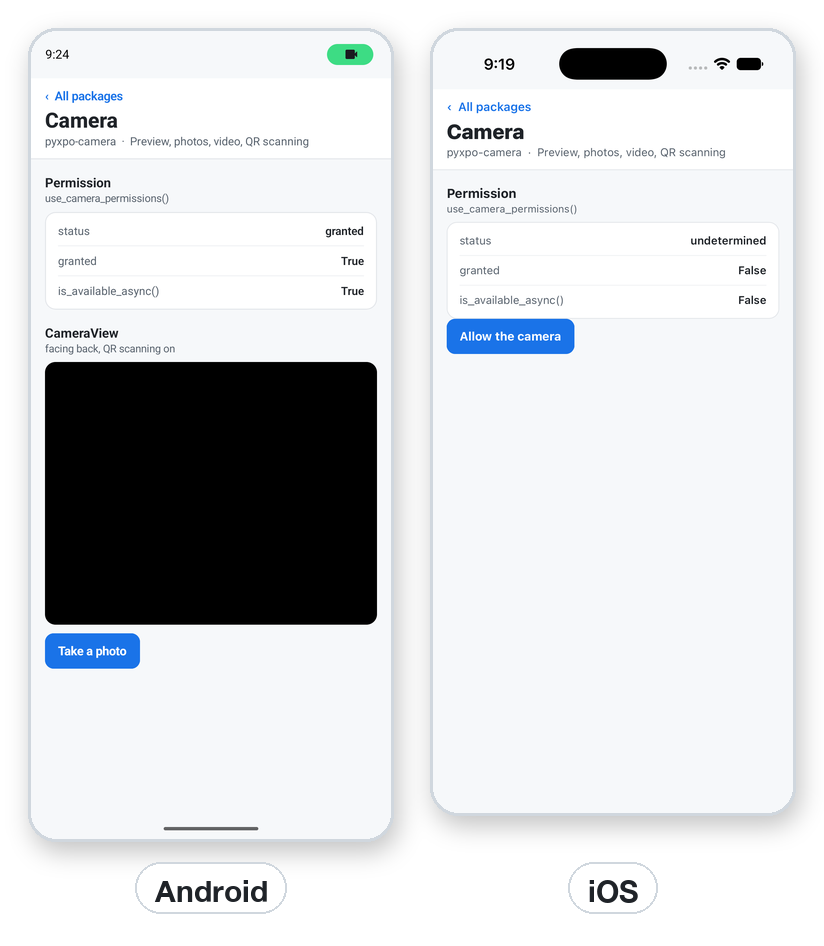
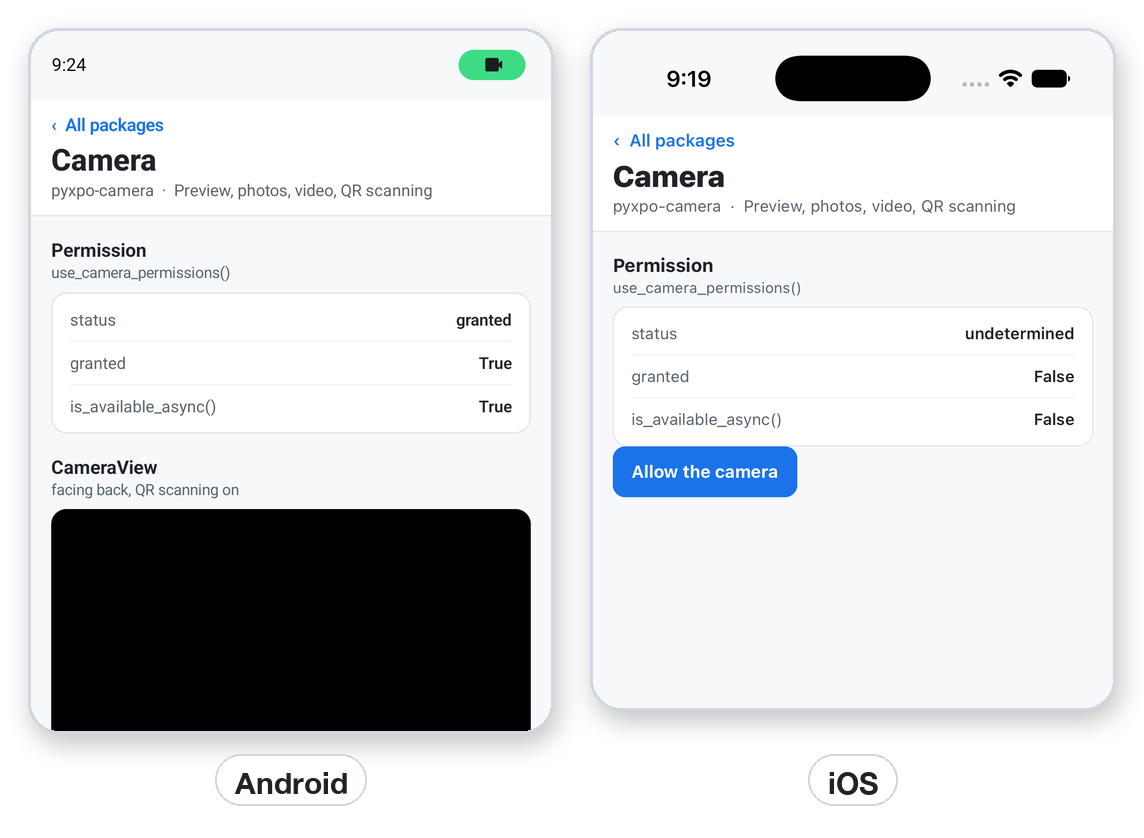
Scan one QR code, then stop the camera and show the result. In the screenshot the Android emulator's dark virtual scene makes the preview black, and the iOS Simulator has no camera, so it reports a mount error. Test scanning on a real phone.
import pyxpo_camera as Camera
from pyxpo import Button, Text, View, component, use_state


@component
def Scan():
    perm, request, _get = Camera.use_camera_permissions()
    code, set_code = use_state(None)
    if perm is None:
        return View()
    if not perm["granted"]:
        return View(Text("The camera is needed to scan tickets."), Button("Allow", request))
    if code is not None:
        return View(Text("Ticket %s" % code), Button("Scan again", lambda: set_code(None)))
    return View(
        Camera.CameraView(
            facing="back",
            style={"flex": 1},
            barcode_scanner_settings={"barcode_types": ["qr"]},
            on_barcode_scanned=lambda r: set_code(r["data"]),
            on_mount_error=lambda e: set_code("camera error: %s" % e.get("message")),
        ),
        style={"flex": 1},
    )
Record a video
record_async returns when recording ends, so start it as a task and stop it from another button. The view needs mode="video", and sound needs the microphone permission unless mute=True.
import asyncio

import pyxpo_camera as Camera
from pyxpo import Button, Text, View, component, use_ref, use_state


@component
def Recorder():
    cam = use_ref(None)
    uri, set_uri = use_state("")

    async def record():
        await Camera.request_microphone_permissions_async()
        video = await cam.current.record_async({"max_duration": 10})
        set_uri(video["uri"])

    def start():
        if cam.current is not None:
            asyncio.ensure_future(record())

    return View(
        Camera.CameraView(ref=cam, mode="video", style={"flex": 1}),
        Button("Record", start),
        Button("Stop", lambda: cam.current and cam.current.stop_recording()),
        Text(uri),
        style={"flex": 1},
    )
Testing
Unit tests run on the desktop host, where the camera does not exist. Test your logic around it, and replace the hook for component tests.
import asyncio

import pyxpo_camera as Camera


def test_availability_on_desktop():
    assert asyncio.run(Camera.is_available_async()) is False


def test_denied_screen(monkeypatch):
    monkeypatch.setattr(Camera, "use_camera_permissions",
                        lambda: ({"granted": False, "status": "denied"}, lambda: None, lambda: None))
    # render Scan() and assert it shows the "Allow" button
Good to know
- Photos are saved in the app cache; the uri is in the result. Use pyxpo-media-library to save one to the gallery.
- A black preview on the Android emulator is its dark virtual scene. Change it in Extended controls > Camera, or use a real phone.
- Nothing scanned? on_barcode_scanned is not set, the type is not in barcode_types, or the code is too small.
- On the web and desktop check await Camera.is_available_async() and offer pyxpo-image-picker's file picker instead.